
Add FlowStudio to ChatGPT or Claude
Connect ChatGPT or Claude to your Power Automate flows in about two minutes. Both apps use the same address and sign you in through your browser.
Which app are you using? ChatGPT · Claude — the steps differ, so jump to yours.
What you are setting up
ChatGPT and Claude cannot see your Power Automate flows on their own. You give them access by adding FlowStudio MCP, a connector for Power Automate. Once it is added they can list your flows, read run history, open the inputs and outputs of any action, build new flows and fix broken ones.
This guide covers the two chat apps. If you work in a code editor, Claude Code, GitHub Copilot and OpenAI Codex have their own guides.
Before you start
You need two logins:
- A ChatGPT or Claude account, whichever app you are using.
- A Microsoft 365 work or school account with a Power Automate license, the account where your flows live. Usually your work email. A personal Gmail or Outlook.com account will not work because it has no business Power Automate.
You do not need a FlowStudio account beforehand. If you have never used FlowStudio, signing in through the connector sets you up on the free Starter plan: 100 calls over 21 days, no credit card. If you already have a FlowStudio plan, it connects to that.
The address you need
Both apps use the same one:
https://mcp.flowstudio.app/mcp/oauth
If you have seen https://mcp.flowstudio.app/mcp in our other guides, that one is for setups where you paste an API key. This address signs you in through your browser instead. Both reach the same Power Automate tools.
Add it in ChatGPT
ChatGPT keeps custom plugins behind a developer mode switch until they are listed in its directory, so you turn that on first.
Step 1: Turn on developer mode
- Open ChatGPT Settings, then Security and login.
- Switch on Developer mode.
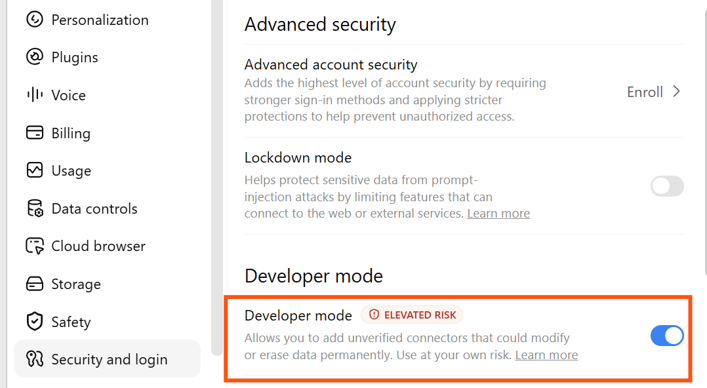
Figure: Under Settings then Security and login, switch on Developer mode
ChatGPT labels this elevated risk and warns that developer mode lets you add unverified connectors that could modify or erase data. It shows that warning for any connector it has not reviewed for its directory. We have submitted FlowStudio for review. Until it is listed, this is how you add it.
Leave Enforce CSP in developer mode alone. It makes no difference here.
Step 2: Create the plugin
- Click Plugins in the left sidebar, then the + button to the right of the search box.
- Name: Any. Icon and description are optional, so skip them.
- Connection: leave the toggle on Server URL and paste
https://mcp.flowstudio.app/mcp/oauth. - Authentication: choose OAuth. Leave the advanced OAuth settings as they are. FlowStudio publishes the settings ChatGPT needs and it discovers them itself.
- Tick I understand and want to continue, then click Create.
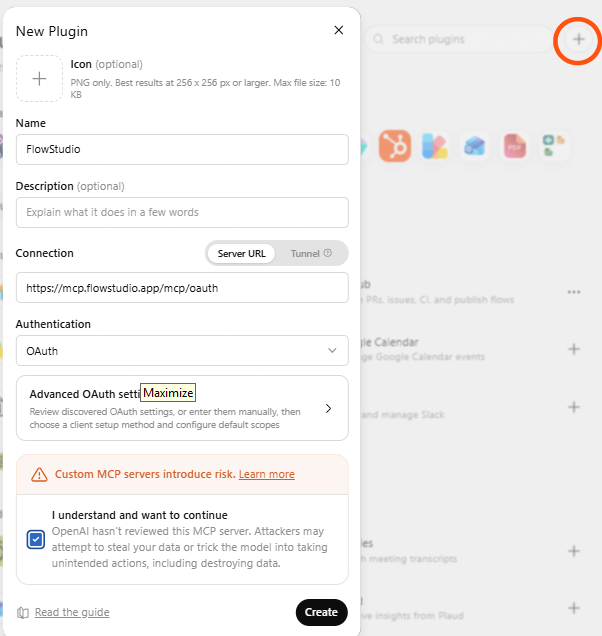
Figure: In the New Plugin dialog, paste the server URL and set Authentication to OAuth
Step 3: Sign in
- ChatGPT sends you to a FlowStudio sign-in page. Click through to Microsoft.
- Sign in with your Microsoft 365 work or school account, the one your flows live under.
- Approve the Power Automate access when Microsoft asks. This is what lets FlowStudio read and change flows as you.
- You land back in ChatGPT with the plugin connected.
Add it in Claude
Claude is simpler. There is no developer mode to turn on and nothing to acknowledge.
Use claude.ai in your browser. Only claude.ai works. From claude.com or console.anthropic.com it fails with an error that does not say why.
- At claude.ai, click your name at the bottom of the left sidebar and choose Settings.
- Choose Connectors in the settings sidebar, under Customize.
- Click Add at the top right, then Add custom connector.
- Paste
https://mcp.flowstudio.app/mcp/oauthand confirm.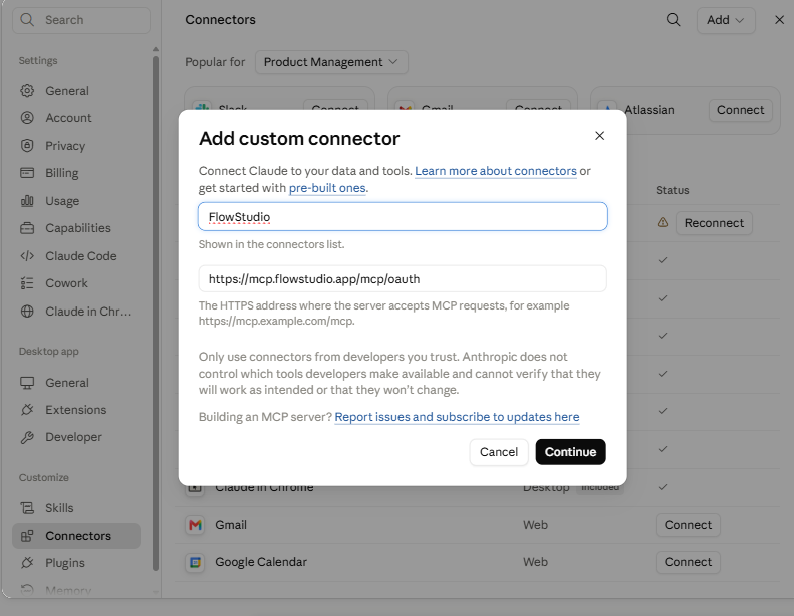
Figure: Name the connector FlowStudio and paste the server URL, then click Continue
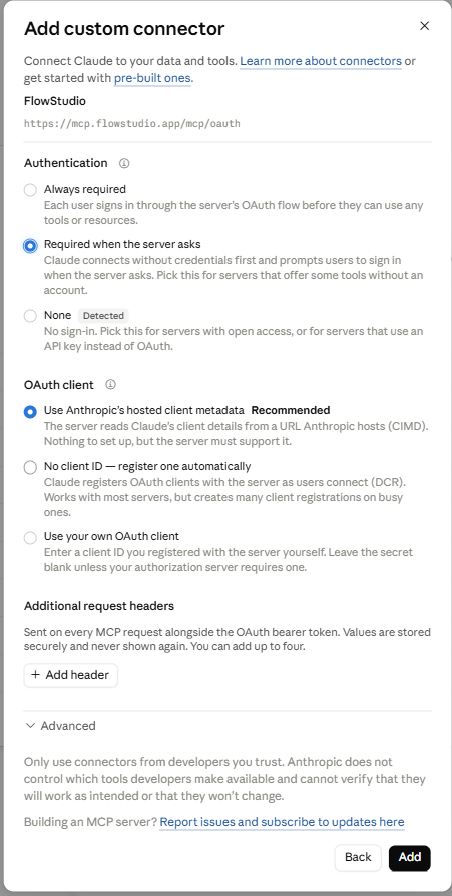
Figure: Leave Authentication and OAuth client on their detected defaults, then click Add
FlowStudio now appears in your connector list as type Web with a Custom badge.
The Microsoft sign-in comes later
Claude does not ask you to sign in while you are adding the connector. It asks the first time you use it in a chat. Open a new conversation, ask something about your flows, and sign in with your Microsoft 365 work or school account when it prompts you. Approve the Power Automate access and the answer comes back.
This catches people out. If you added the connector and nothing seemed to happen, that is normal. Ask it a question.
Check it worked
Ask for something small first:
"List my Power Platform environments"
If your environments come back, you are connected. In Claude this is also the prompt that triggers the Microsoft sign-in, so expect that the first time. The prompt uses one of your 100 free Starter calls.
What you can ask for once it is connected
| You ask | What happens |
|---|---|
| "List my Power Automate flows in the Default environment" | Returns the flows in that environment by name. |
| "Why did my HR Sync flow fail this morning?" | Reads the run history, opens the failed action, and gives you the actual error and the inputs behind it. |
| "Show me the inputs and outputs of the last Invoice Processing run" | Returns the action-level detail you would otherwise click through in the portal. |
| "Build a flow that posts to Teams when a new item is added to my Issues list" | Works out the connections, builds the flow, and deploys it to your environment. |
| "Fix the expression error in that flow and update it" | Patches the flow definition and saves it back to Power Automate. |
| "Resubmit yesterday's failed run" | Re-runs it with the same trigger data. |
What ChatGPT and Claude can see
You sign in on Microsoft's own pages. The Microsoft token stays with FlowStudio and is never handed to ChatGPT or Claude. What they get is a FlowStudio key that only works against FlowStudio, and only for the account that signed in.
Neither app can call Power Automate directly. Everything goes through FlowStudio, where it counts against your plan and where you can revoke access any time from mcp.flowstudio.app.
FlowStudio acts as you. It can only reach the flows and environments your own account can reach, and every change is recorded against your name in Power Automate.
Troubleshooting
- There is no Plugins entry in the ChatGPT sidebar. Developer mode is off. Turn it on under Settings > Security and login and the entry appears.
- The Create button does nothing. The acknowledgment checkbox at the bottom of the New Plugin dialog has to be ticked before it will submit.
- ChatGPT asks for a client ID or secret. You are in the advanced OAuth settings. Back out and leave them alone. FlowStudio publishes what ChatGPT needs and it discovers the settings on its own.
- Claude refuses to add the connector. Check the address bar. Only
claude.aiworks. From claude.com or console.anthropic.com the request is rejected and the message will not tell you that is the reason. - You added it in Claude and were never asked to sign in. Correct. Claude prompts on first use in a chat, not while adding. Ask it about your flows.
- Your flows are missing after connecting. You probably signed in with the wrong Microsoft account. Remove the connector, add it again, and pick the work or school account your flows live under.
- The Microsoft sign-in will not complete. Some tenants block the Power Automate consent for non-admins. If yours does, a browser key is the way round it.
- You run out of calls. The free Starter plan is 100 calls over 21 days. Pricing covers what comes next.
Frequently asked questions
How do I connect ChatGPT to Power Automate?
Turn on Developer mode under Settings > Security and login, then open Plugins, click +, paste https://mcp.flowstudio.app/mcp/oauth as the Server URL, set Authentication to OAuth and click Create. Sign in with your Microsoft 365 work or school account when prompted.
Why does ChatGPT warn about elevated risk?
It shows that warning for every custom plugin not yet listed in its directory, not for FlowStudio specifically. Developer mode is simply how you add any unreviewed connector, and the dialog tells you OpenAI has not reviewed the server. FlowStudio has been submitted for review. The safeguards that matter are on our side and they do not depend on that review: your Microsoft token is never handed to ChatGPT, FlowStudio reaches only the flows your own account can reach, and you can revoke access at any time.
Do I have to turn on Developer mode?
For now, yes. ChatGPT only allows custom plugins in Developer mode until they are listed in its directory. Once FlowStudio is listed, this step disappears.
How do I connect Claude to Power Automate?
At claude.ai open Settings > Connectors, click Add then Add custom connector, and paste the address above. No developer mode and nothing to acknowledge. Claude Code and Claude Desktop are the editor and desktop routes and are covered in the Claude guide.
I added the connector in Claude and nothing happened.
Expected. Claude runs the Microsoft sign-in the first time you use the connector in a chat, not while you are adding it. Open a conversation, ask something about your flows, and sign in when it prompts.
Do I need a paid plan?
No. The free Starter plan is 100 calls over 21 days with no credit card, and signing in through the connector creates it for you if you are new.
Does ChatGPT or Claude get access to my Microsoft account?
No. The Microsoft token stays with FlowStudio. ChatGPT and Claude get a FlowStudio key that only works against FlowStudio and only for the account that signed in.
Why does it fail from claude.com?
Only claude.ai is recognised. claude.com and console.anthropic.com are refused, and the error does not explain why. Open claude.ai instead.
Can I use a personal Microsoft account?
No. You need a Microsoft 365 work or school account with a Power Automate license, the same one you open Power Automate with today.
Is FlowStudio in the ChatGPT app directory?
It has been submitted and is in review. Until it is listed, add it as a custom connector using the steps above. Nothing changes for you when the listing goes live; it just becomes easier to find.
Is FlowStudio affiliated with OpenAI, Anthropic or Microsoft?
No. FlowStudio is an independent product. It is not affiliated with, endorsed by, or sponsored by OpenAI, Anthropic or Microsoft. It uses the open Model Context Protocol to talk to ChatGPT and Claude, and the Power Platform API to talk to Power Automate.
Next steps
- Not sure which AI agent to use? Compare ChatGPT, Claude, Copilot Studio and the rest.
- Debug a failed flow once you are connected.
- Pricing: what happens after the free 100 calls.
FlowStudio is an independent product and is not affiliated with, endorsed by, or sponsored by OpenAI, Anthropic or Microsoft. OpenAI and ChatGPT are trademarks of OpenAI. Claude is a trademark of Anthropic. Microsoft, Microsoft 365, Power Automate, Power Platform and Copilot are trademarks of the Microsoft group of companies.