
Edit Power Apps canvas apps with your AI agent
Last updated 25 October 2026. The canvas tools are a Preview in FlowStudio MCP, the Power Automate MCP server, included in every account and free until 30 November 2026.
FlowStudio MCP is a hosted MCP server for Power Automate. Its canvas tools, in Preview since September 2026, let the AI agent you already use create a Power Apps canvas app or open one you have, read its screens, controls, Power Fx and data sources, change them, add a SharePoint, SQL, Excel or Dataverse table, and land the change as a draft. The agent can be ChatGPT, Claude, Copilot Studio, Cowork or a coding agent. One agent can fix the flow and the app that calls it in the same conversation. The canvas tools are included in every account, and free while they are in Preview.
| The short version: Ask your agent to list your canvas apps. If you connected it before 24 October 2026, reconnect it once first. Edits land in a draft. Nothing reaches your users until the agent, or you, publishes. |
What your agent can do
| You say | What happens |
|---|---|
| “List the canvas apps in the Sales environment” | Agent returns the apps with their ids and metadata |
| “Create a tablet app called Leave Requests” | Agent creates the app from a blank tablet layout and opens it for editing |
| “What screens and data sources does the Expense Claims app have?” | Agent opens the app and returns its screens, data sources, sizes and App Checker findings |
| “What columns are on the Claims SharePoint list?” | Agent reads the data source with real column names and types, so it checks column names before it writes a formula |
| “Add the Leave Approval SharePoint list to the app” | Agent adds the list as a data source, using your SharePoint connection |
| “Change the title on the Home screen to Expense Claims and make the submit button green” | Agent finds the exact control and property names, previews the change, pushes it as a draft |
| “What changed between the published version and the draft?” | Agent diffs the two, per control and property |
| “Publish the draft” | Agent publishes; users get the new version once publishing completes |
The fastest way to see it is to run it on a test app. Canvas tools are free while in preview, which ends 30 November 2026.
Start your free evaluation Starter plan: 100 calls, 21 days, no credit card
What you get with every edit
- It works with Power Apps Studio closed. An agent can run a whole session of edits without anyone in Studio.
- Every change lands as a saved draft version with a note, and publishing is one call. Your users stay on the published version until you say so.
- It adds data sources itself: SharePoint lists, Excel tables, SQL Server and Dataverse tables, with the connection attached.
- Before it writes a formula it reads the real column names and types, so a misspelled column is caught with the data source in scope.
- Every edit is dry-run first. The dry run names the controls it could not find, so a typo never reaches the app.
- Renaming a control or a screen rewrites every formula that refers to it.
- Deleting a control that a formula still uses is refused, and the refusal names the formula.
- If someone saves the app in Studio while the agent works, the push is refused with both versions named, the diff shows exactly what moved, and the agent can take the edit lease so Studio cannot save over its import.
- It creates an app from a phone, tablet or responsive layout, copies an existing app, and can save a session as a new app.
- It runs from ChatGPT or Claude over the same connection that reads your flows, so the same agent fixes the flow and the app that calls it.
All of this happened in our own test on 25 October 2026: a blank app that grew to four screens and three data sources over five rounds of edits, with Studio closed the whole time.
Included in every FlowStudio MCP account
The canvas tools are part of every FlowStudio MCP account, in Preview. Agents read the tool list once when they connect, so an agent you connected before 24 October 2026 needs one reconnect, and then it has them.
Canvas tools are free while in preview, which ends 30 November 2026. From 1 December canvas calls count toward your plan, one MCP call each, the same as a flow call. From 16 November every canvas result carries that reminder.
Edit a canvas app from ChatGPT
- Add FlowStudio MCP to ChatGPT. The steps are on Add FlowStudio to ChatGPT or Claude. You sign in with your Microsoft work account and there is no key to copy.
- If you added FlowStudio before 24 October 2026, reconnect it once so ChatGPT picks up the canvas tools.
- Ask for a dry run first. For example:
Use FlowStudio MCP. Open the canvas app "Expense Claims" in the default environment.
Do a DRY RUN only, do not push, of these edits on the screen "Home":
1. lblTitle, property Text, formula "Expense Claims"
2. btnSubmit, property Fill, formula RGBA(46, 125, 79, 1)
Show me the raw JSON the dry run returns.
When the dry run looks right, say “push those edits as a draft”, check the draft, then “publish the draft”. The same steps work in Claude; the screenshot further down is from ChatGPT.
How an edit works
An edit is a short sequence, and the server keeps the state for you, so the agent does not have to remember where it was after a long conversation.
- Open the app. The server downloads and unpacks it and starts an edit session. Every canvas response from then on carries a
sessionblock: whether edits are pending, how old the session is, and whether the live app has moved since you started. - Look before you change. The agent reads the control tree for a screen to get exact control and property names, and the data sources to get real column names.
- Edit in the session. Changes go to the session copy. A dry run reports each edit as from and to, and names any edit that matched nothing, which is the cheapest way to catch a mistyped control name.
- Push. One push imports every staged edit as a single new draft version and closes the session. A short note passed with the push shows in the app’s version history. Users are still on the published version. If the app calls Power Automate flows, read the push response: in testing, a push has invalidated the app-to-flow binding, and the response names the flows to recheck in Studio before you publish.
- Check the draft. Open it in Power Apps Studio or diff it against the published version.
- Publish. The draft goes live. Publishing is asynchronous, so the app may serve the old version for a few seconds.
If someone else edited the app in the meantime, the push is refused and the response says what changed. The agent can diff its session base against the new head, decide what to keep, and re-push against that head so its edits go on top of the newer files. A silent overwrite of a maker’s work is the one thing the design rules out.
What a real edit looks like
These are responses from our own test app, a copy of a live timesheet app with 13 data sources, taken on 3 September 2026. Ids and the app name are shortened. Three edits were sent as a dry run, one of them to a control that does not exist.
{
  "dryRun": true,
  "wouldApply": 2,
  "wouldNotMatch": [
    { "screen": "Timesheet Screen", "control": "btn_NoSuchControl",
      "property": "Text", "applied": false, "reason": "control not found" }
  ],
  "changes": [
    { "screen": "Timesheet Screen", "control": "btn_Submit",
      "property": "AccessibleLabel", "to": "\"Submit timesheet\"", "applied": true, "yamlMirrored": true },
    { "screen": "Timesheet Screen", "control": "btn_Save",
      "property": "AccessibleLabel", "to": "\"Save timesheet\"", "applied": true, "yamlMirrored": true }
  ],
  "note": "Nothing written. Re-call without dryRun to stage, and with push:true to import.",
  "session": { "open": false, "basedOnVersion": "20260903T040151Z", "expiresAt": "2026-09-10T04:03:28Z", "pendingEdits": 0 }
}
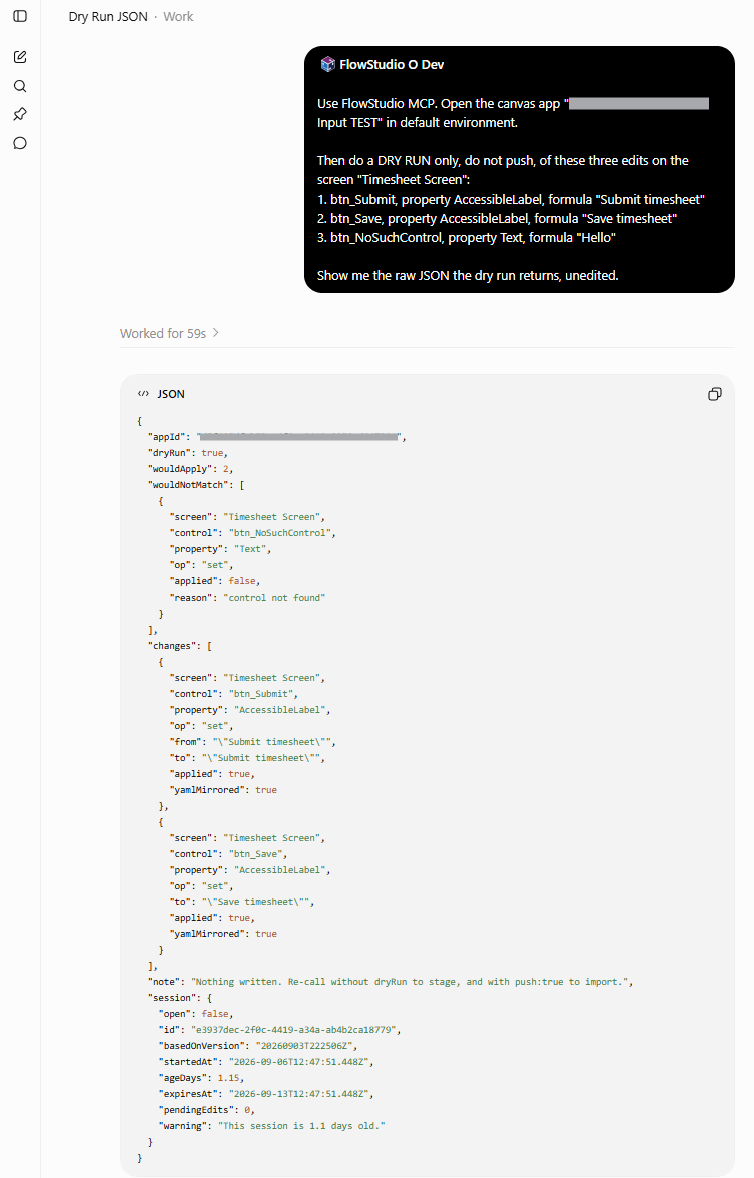 Figure: A dry run names the control it could not find and writes nothing
The mistyped control is named and nothing is written. The same call with push: true imports the two good edits as a draft and says how long the import took. The response below is trimmed to the lines that matter.
{
  "applied": 2,
  "pushed": true,
  "landedAs": "draft",
  "builtOn": "20260903T040151Z",
  "landedAsVersion": "20260903T040444Z",
  "importTook": { "text": "1 s", "landedAt": "2026-09-03T04:04:44Z" },
  "files": { "total": 19, "replaced": 2, "added": 0 }
}
Version history then shows the draft sitting behind the version users are on, until you publish.
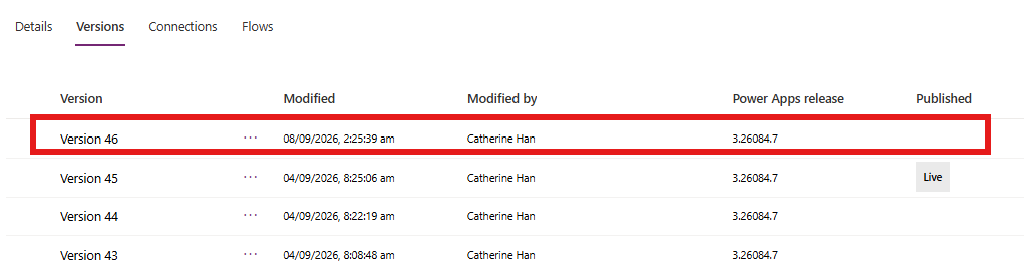 Figure: The pushed edit lands as a draft. Users stay on the live version until you publish
{
  "note": "Drafts are versioned too. lifeCycleId says which. isLive marks the version users see.",
  "versions": [
    { "version": "20260903T040444Z", "lifeCycleId": "Draft",     "isLive": false },
    { "version": "20260903T040151Z", "lifeCycleId": "Published", "isLive": true }
  ]
}
Publishing is one call, and the response says the app may serve the old version for a few seconds.
{
  "published": true,
  "note": "Publish is asynchronous. The app may serve the previous version for a few seconds.",
  "session": { "open": false }
}
Opening the app also returns the App Checker findings recorded at the last Studio save, so the agent can see what Studio already flags, for example acc-AccessibleLabelNeeded on a button, before it starts.
Check before you publish
check_canvas_formula runs Microsoft’s open-source Power Fx checker, Microsoft.PowerFx.Core, over one formula or over every formula in the app, and reports unclosed brackets, unknown functions, misspelled names and wrong argument counts with the character position of each. The checker runs on the FlowStudio server as WebAssembly, so formulas never leave it. It is advisory: it warns, it never blocks a push, and it can be wrong both ways. Every formula the agent writes through update_canvas_app gets the same check, and problems come back as warnings on that edit.
A formula that gets past the check can still fail when the app runs. So the habit that keeps a draft safe is short:
- ✗ The agent restructures a screen, skips the dry run, and pushes.
- ✓ The agent changes property values, checks the formula, dry-runs, reads the edit back, pushes, diffs the draft against the published version, then publishes.
- ✗ You leave the app open in Studio while the agent pushes, then save from Studio. That save writes Studio’s copy over the head and the pushed edit is gone.
- ✓ You close Studio before the session, and reopen it after the publish to look at the draft.
If someone has to keep Studio open, the agent can take the app’s edit lease for the push. Their tab goes read-only until they reload it, so Studio cannot save over the import.
What it does not do
It works on canvas apps only, not model-driven apps.
Data sources are read from the app package, so they reflect the last save. For a Dataverse table the app already uses, the agent can re-read the live table so new columns can be used.
The formula check is advisory. A formula it passes can still fail when the app runs, and one it flags can be fine.
Sessions expire after 7 days and unpushed edits go with them. That is housekeeping. The moved-base check above is what protects the app.
How it differs from Microsoft’s Canvas Authoring MCP server
Microsoft ships its own MCP server for canvas apps. Its guide, Create and edit canvas apps with AI code generation tools, is dated 27 August 2026. Both are real and both work. Microsoft’s runs on your machine as a plugin for GitHub Copilot CLI, Claude Code or VS Code, works inside an open Power Apps Studio session with coauthoring on, builds a new app from blank or edits an existing one, and validates the YAML it generates before it syncs. FlowStudio’s runs as a hosted service, works from ChatGPT, Claude, Copilot Studio and Cowork as well as coding agents, creates an app or edits one you have with Studio closed, lands every change as a draft, diffs versions, and refuses a push if the app moved.
Pick Microsoft’s when you work in a coding agent with Studio open beside it and want the YAML validated as it is written. Pick FlowStudio when the agent you already use should create or change an app with Studio closed, with a draft between the agent and your users, and when the same agent is fixing the flows behind that app. The full side by side is on FlowStudio MCP vs Microsoft’s Canvas Authoring MCP server.
The 14 canvas tools
| Tool | What it does |
|---|---|
| list_canvas_apps | List the canvas apps in an environment. Metadata only. |
| create_canvas_app | Create an app from a phone, tablet or responsive blank, a split-screen or sidebar layout, or as a copy of an existing app. Then open it with get_canvas_app. |
| get_canvas_app | Open an app and start an edit session. Returns screens, data sources, sizes and App Checker findings. Call this first. |
| list_canvas_controls | Names only: the app as a tree of screens and controls with their types, or the control types you could add. |
| describe_canvas_control | Full detail for one name. A control, screen or the App comes back with its properties and Power Fx; a control type with its properties, defaults and variants. This is where the exact control and property names come from. |
| check_canvas_formula | Run Microsoft’s open-source Power Fx checker over a formula, or every formula in the app, before you write it. Warns, never blocks. |
| get_canvas_app_sources | The app’s data sources with columns and types, Dataverse tables included, and which connection feeds each one. |
| get_canvas_app_files | List or read files inside the app package. |
| update_canvas_app | Set or remove a formula; add, delete, move or rename a control; add, delete or rename a screen; add, refresh or remove a data source. Dry run previews, push imports as a draft. |
| update_canvas_app_files | Create, update or delete files in the package: a new screen, an image, App.pa.yaml. |
| discard_canvas_app_session | Throw away the session and every unpushed edit. The app itself is untouched. |
| publish_canvas_app | Publish the current draft so users get it. |
| list_canvas_app_versions | Version history. Drafts are versioned too. |
| diff_canvas_app | Compare two states of an app, per control and property: two version ids, or published, draft, session and base. |
Full parameters are on the MCP Tools Reference, and your agent gets the authoritative schema from tools/list.
For agents: load the canvas bundle with tool_search and the query skill:canvas-app. It returns the tools in the order above with the session rules attached.
Editing a canvas app with an AI agent: questions
Is this the same as Power Apps vibe?
No. Power Apps vibe at vibe.powerapps.com is Microsoft’s own app builder. FlowStudio MCP lets the AI agent you already use, in ChatGPT, Claude, Copilot, Codex or Cowork, open an app you already have and change it, alongside the flows behind it.
Can the agent create a new app?
Yes. It starts a new app from a phone, tablet or responsive blank, a split-screen or sidebar layout, or as a copy of an app you already have, then opens it and edits it like any other. Inside an app it can add screens, controls, images, data sources and formulas.
How do I edit a canvas app from ChatGPT?
Add FlowStudio MCP to ChatGPT, then ask it to open the app and dry-run the change. If you added FlowStudio before 24 October 2026, reconnect it once so it picks up the canvas tools. The push lands as a draft and you publish when you have checked it.
Do I have to turn the canvas tools on?
No. They are included in every account, in Preview. Agents read the tool list once when they connect, so an agent you connected before 24 October 2026 needs one reconnect.
Can an edit break my live app?
Edits go to a session, then to a draft. Users keep the published version until you publish the draft. Push is refused if someone changed the app after your session started, so the agent cannot overwrite a maker’s work without you deciding to.
Do canvas calls cost more than flow calls?
No. Canvas tools are free while in preview, which ends 30 November 2026. From 1 December canvas calls count toward your plan, one MCP call each, the same as a flow call. The free Starter plan includes 100 calls over 21 days, and Pro, Pro+, Team and Business plans are on the pricing page.
Start here
Free evaluation: 100 calls, 21 days, no credit card. Connect your agent and ask it to open a test app.
Start your free FlowStudio MCP evaluation
Related guides
- MCP Tools Reference: every tool, including the canvas ones, with parameters
- Getting Started with FlowStudio MCP: connect your agent
- Add FlowStudio to ChatGPT or Claude: the connector route, sign in with your Microsoft account
- Build Power Automate flows with AI agents: the flow side of the same agent
- FlowStudio MCP vs Microsoft’s Canvas Authoring MCP server: which fits, and when to run both
- FlowStudio MCP vs the Power Platform CLI MCP: where the
paccommand line fits - FlowStudio MCP plans and pricing
FlowStudio is an independent product and is not affiliated with, endorsed by, or sponsored by Microsoft Corporation. Microsoft, Power Automate, Power Apps, Power Platform, and Copilot are trademarks of the Microsoft group of companies.