My favourite way to build Power Apps canvas apps right now is Codex with FlowStudio MCP and a...
I connected Claude and ChatGPT to FlowStudio MCP and asked each one to build a morning tea roster as a Power Apps canvas app, just by chatting. Each one built the app, the SharePoint list behind it and two Power Automate flows that send the roster as a PDF in Teams. Both took 30 to 40 minutes, and I didn't open Power Apps Studio.
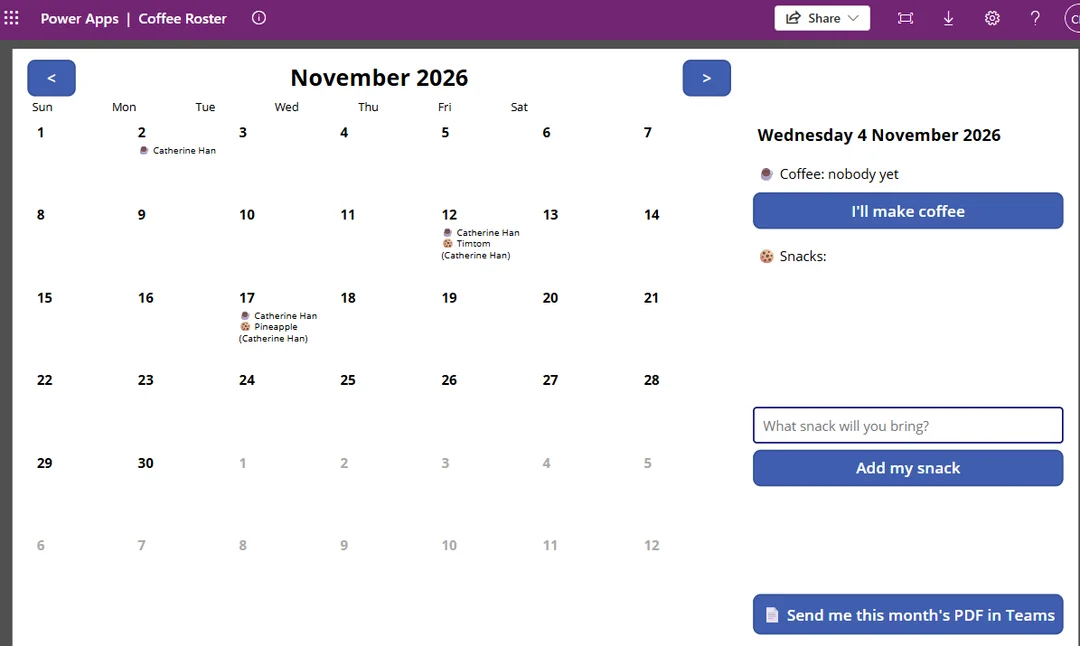
Figure: The Coffee Roster app Claude built
How people usually use AI agents on canvas apps
When I hear people talk about AI agents and canvas apps, it's usually one of two ways. You export the app as YAML, the text files that describe its screens, controls and formulas, an agent edits them, and you bring the result back into Studio. Or you open the app in Power Apps Studio with co-authoring turned on, and keep Studio open while a coding agent makes the changes through Microsoft's canvas apps plugin.
Both are helpful, but you're still the middleman.
My partner John Liu and I recently added canvas app tools to FlowStudio MCP, our Model Context Protocol (MCP) server that connects AI agents to your Power Platform environment. The agent opens the app in your environment, changes it and saves a draft, the same way it already reads and builds your flows. You talk to it in an ordinary ChatGPT or Claude chat.
There's a side-by-side comparison of FlowStudio MCP and Microsoft's Canvas Authoring MCP server if you want the detail.
The prompt
Create a Canvas app in a calendar view format. The purpose is for people to volunteer making morning tea. Each day we only need one person to make coffee, but can have multiple snacks. People can see what's being brought by who in the calendar, or click on a day to enter. Include a "Send PDF" button to send a PDF for the schedule on Teams. Also, every Friday send me the PDF so I can print it out.
I asked Claude for the same thing in my own words.
What the agents built
- The canvas app
- A SharePoint site named "Coffee Roster" (Claude made one; ChatGPT used an existing site)
- A SharePoint list that holds the volunteer schedule
- The site's Documents library, which holds the saved PDFs
- Two Power Automate flows: one that the app button starts, which builds the PDF and sends it in Teams, and one that runs every Friday
Claude asked two questions before it built anything. Should the bookings live in a SharePoint list, and on which site, or in a Dataverse table? And should the Friday PDF cover the coming week or the whole month?
The agent asked for my permission before creating a new connection for a flow, and added the data sources to the app itself.
Four things that made it work
A helper flow created the SharePoint site
When Claude asked where the data should live, I asked for a new site called Coffee Roster. It's overkill for a roster, but I wanted to test it. There's no tool for creating a site, so Claude offered to build a one-off flow that creates the site and its list, then run it. I said yes, and to delete the helper afterwards. The site and list were ready in about a minute. Later it used two more helper flows, one to make a PDF Requests list and one to add a test request, and deleted each one when it was done.
The button runs the flow directly
The PDF button runs the flow directly. The agent added the flow to the app, so pressing the button builds that month's PDF, saves it to the site and posts a link to it in Teams for whoever pressed it.
Push back when the agent says it can't
Twice I pushed back when Claude said it couldn't do something, and both times it found another way. When it said it couldn't hook the button up to the flow, I told it: "I don't believe that you cannot connect the flow to the app. You definitely can. Just give it a try." That's when it came up with a workaround: the button added a row to a list, and the flow started from the new row. Since then the canvas tools can add a flow to an app, so the button now runs the flow directly. When it said it couldn't trigger the flow to test it, I asked why not. It created a real request with another helper flow, and the PDF arrived in Teams about a minute later.
Let the agent test it, then give feedback
The agent tested its own work by triggering the flows and checking the runs and the output. The first PDF I opened was blank, because nobody had signed up yet. I said I expected to see the calendar even with no names on it. Claude rebuilt the layout in both flows: seven columns from Sunday to Saturday, every day numbered, the neighbouring months' days greyed out, and the coffee and snack names inside each day. I didn't fix anything by hand.
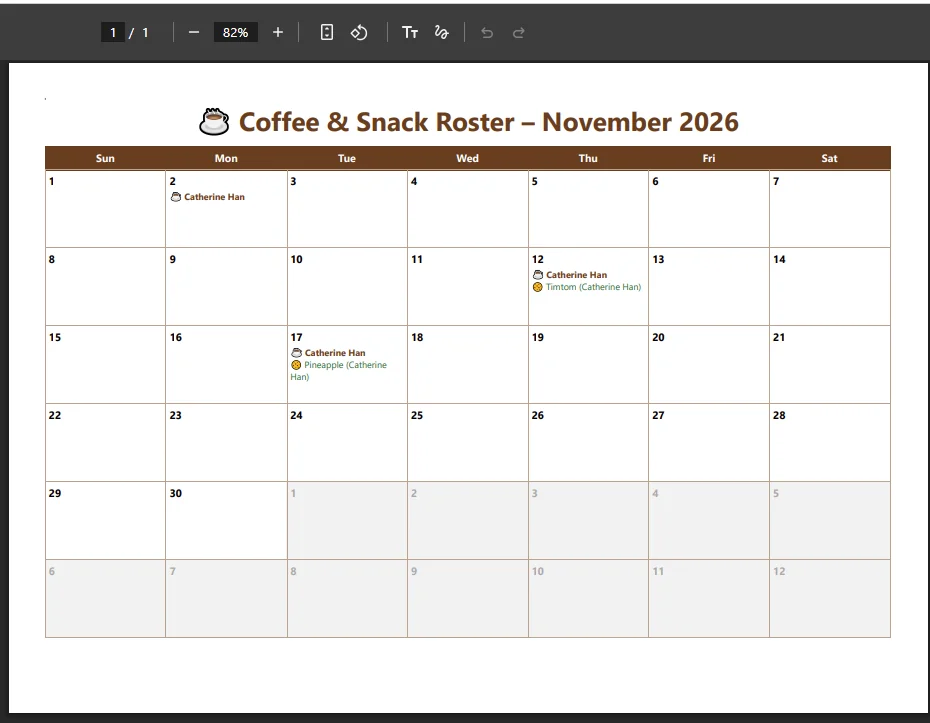
Figure: The roster PDF from Claude's flow, after my feedback
ChatGPT vs Claude for building canvas apps
I find the way Claude works more solid. It asks more clarifying questions.
ChatGPT has an advantage for canvas apps, though. Claude can read the app's controls, positions and formulas, but as it told me, "I can't see it rendered on screen." ChatGPT can open the app in a browser inside the chat, look at it, and improve the design itself over several rounds.
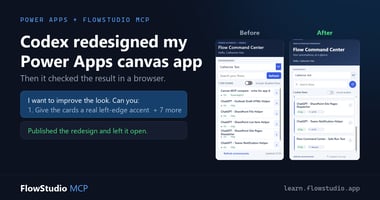
I used the same browser approach with Codex to redesign a canvas app.
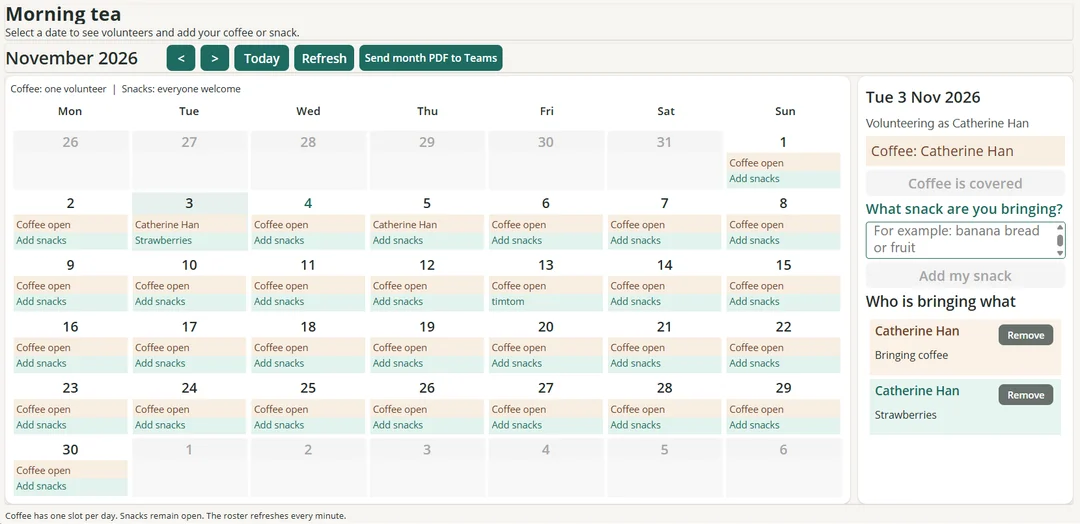
Figure: The Morning Tea Planner app ChatGPT built
Try it: connect ChatGPT or Claude to FlowStudio MCP
The steps are on Add FlowStudio to ChatGPT or Claude. You sign in with the Microsoft work account you use for Power Apps.
Then paste the prompt above, or describe your own app. Tell the agent which environment to build in, and where the data should live if you already know.
More on what the canvas tools do: Edit Power Apps canvas apps with your AI agent.
The canvas tools save each change as a draft. On an app other people use, ask the agent to stop at the draft and publish it yourself once you've checked it.
Catherine Han, FlowStudio
OpenAI, ChatGPT and Codex are trademarks of OpenAI. Claude is a trademark of Anthropic. Microsoft, Power Apps, Power Automate, Power Platform, Dataverse, SharePoint and Teams are trademarks of the Microsoft group of companies. FlowStudio is not affiliated with or endorsed by these companies; names are used for identification only.