A failed flow sends an HTTP trigger. A Copilot Studio agent reads the run history, produces a...
TL;DR: I open-sourced an IT service desk built almost entirely by AI agents: 30+ production Power Automate flows, a Copilot Studio triage agent, six scoped executors, and an SPFx portal, all on the Microsoft 365 a tenant already pays for. It won the Cowork Collective track of Microsoft's Agent Academy hackathon. This is the teardown: the architecture, the build phase by phase, the security model, and the parts that aren't production-hardened. The repo is public. Your own agent can read it and stand the whole thing up. github.com/ninihen1/copilot-studio-itsm-agent
One thing up front, because it changes how you should read the rest: this is a working proof of concept, not a production-hardened product. The core ticket → triage → approve → execute → audit pipeline runs on a live Microsoft 365 tenant, end to end. Off the happy path there are rough edges, and a few paths are designed and specced rather than fully wired, and the repo is explicit about which. Treat it as a reference build to learn from, not a turnkey download. I'll point out the seams as we go.
Video: The help desk in action: AI agents built and run it in Microsoft 365 (5 min)
Why build it at all
Most ITSM platforms (ServiceNow, Jira Service Management, Zendesk) charge per seat, per month, and for a small or medium business that runs into the thousands a year. For what is mostly password resets, group adds, and licence requests, that's hard to justify. The bet here: do the same job on tools an M365 tenant already has (SharePoint, Power Automate, and Copilot Studio) and automate the routine work end to end. No separate ticketing subscription, no per-agent SaaS fee, one identity model, one security boundary.
The second bet, and the more interesting one: don't build it by hand. The whole system is designed to be co-worked with AI agents. The person who ran this build had never deployed an SPFx package by hand and didn't need to learn. The agent did it. The labour shifts from "build and operate a ticketing platform" to "supervise an agent that does."
The architecture
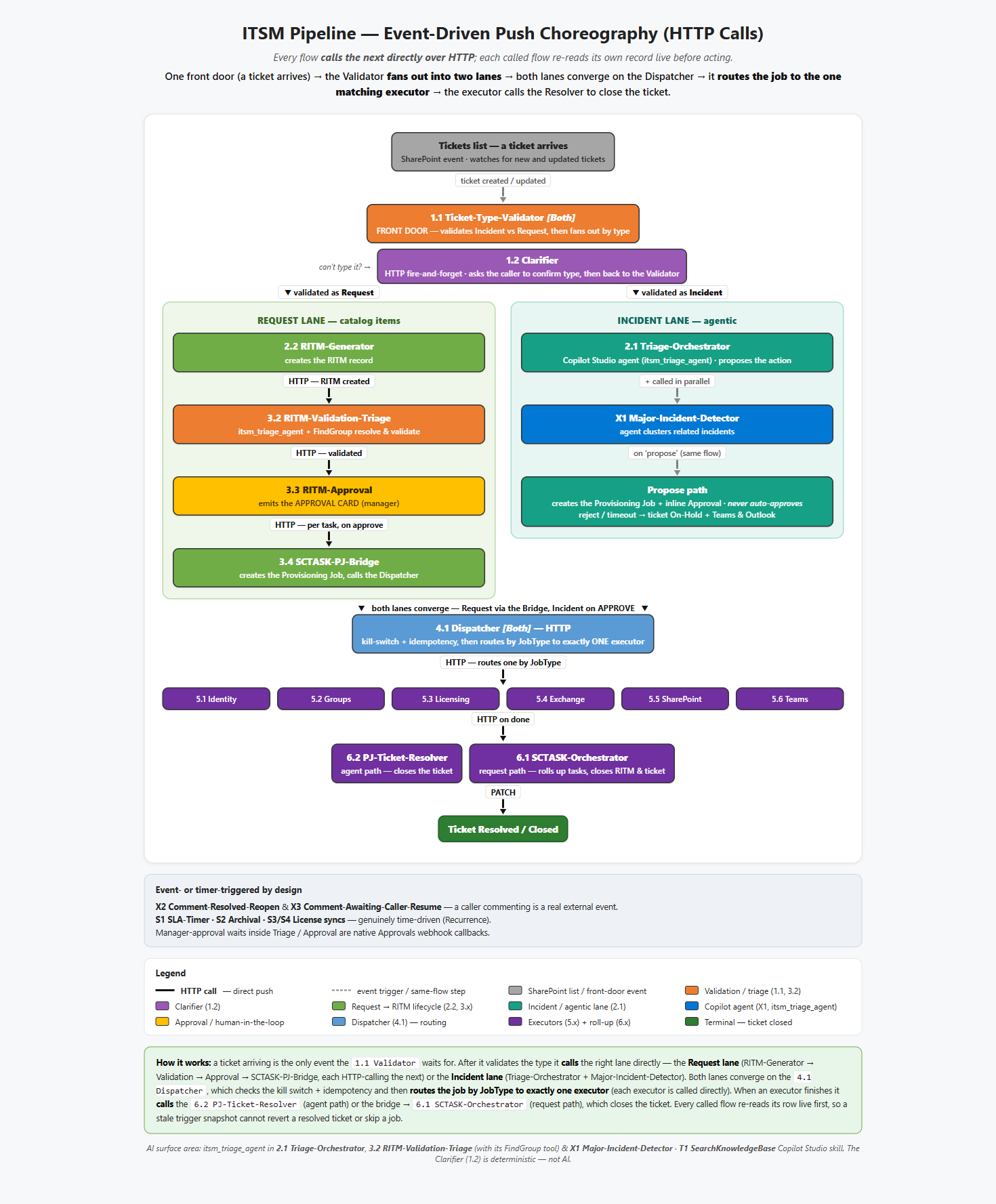
Figure: The ITSM pipeline: intake, type gate, AI triage, approval, dispatch, execution, audit
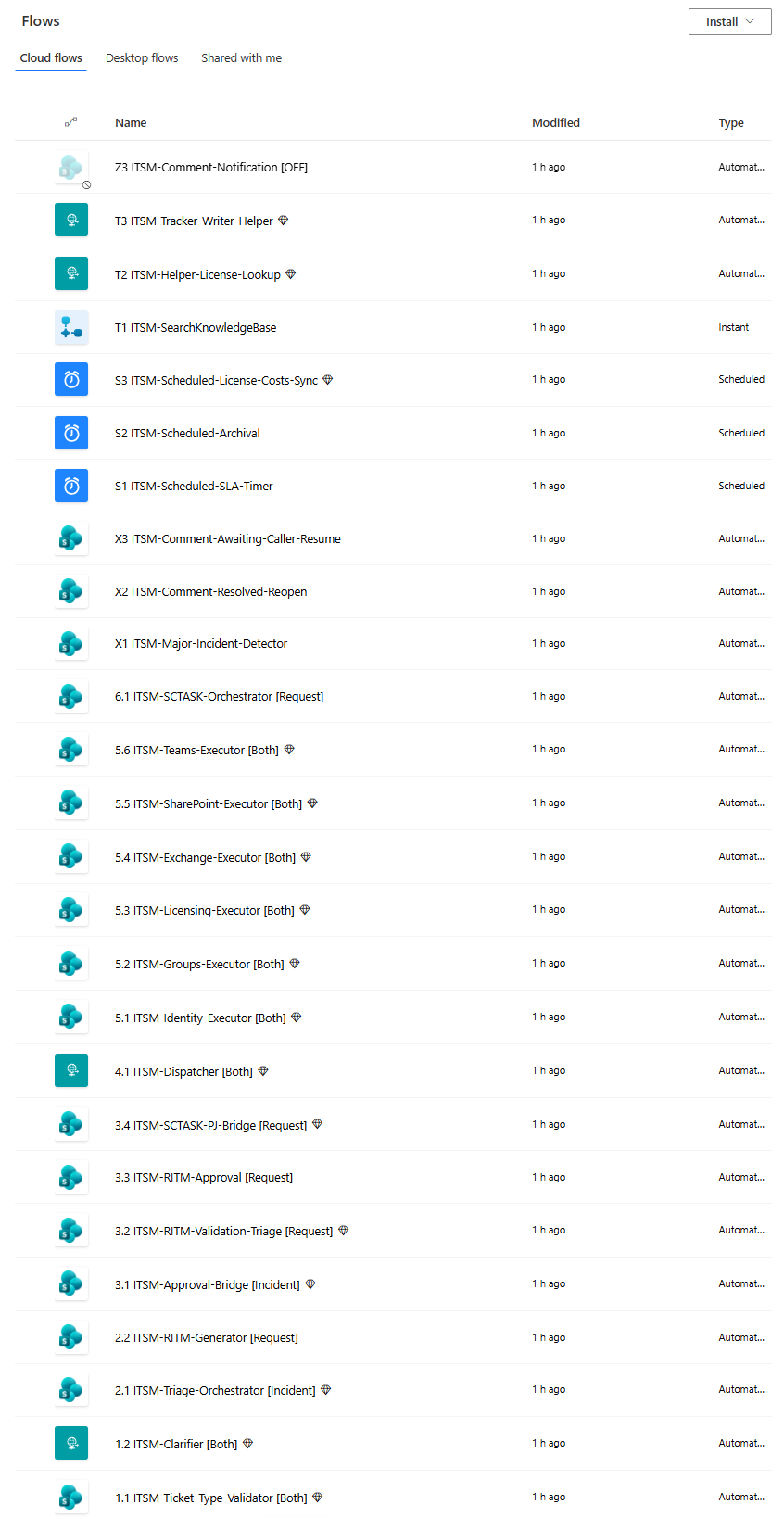
Click to view full size
Figure: The same pipeline as real Power Automate flows, numbered by stage
It's an event-driven pipeline. There is no chatbot to talk to. The agent isn't a front door, it's a triage brain a flow calls in the background on the submitted ticket. Six stages:
- Intake. A user submits a ticket in the ITSM Service Portal (the SPFx app, below). It lands as a row in a SharePoint list. SharePoint is the system of record. There's no separate database.
- Type gate. Incident or Request? The pipeline routes accordingly before any automation runs.
- AI triage. The instant the ticket is saved, a Power Automate flow fires on the new item and calls the Copilot Studio triage agent. The agent classifies the ticket against the service catalog, tries to deflect it with a knowledge-base answer, and returns one of four outcomes: resolve from KB, ask for more detail, propose an action, or hand off to the IT Service Desk queue when it can't be automated. It is read-only: it proposes, it never changes anything.
- Approval. Anything that would change the tenant pauses for a manager's approval in Teams, a one-tap Adaptive Card. Nothing privileged happens without that tap.
- Dispatch. An approved job is validated, and the dispatcher routes it to the one matching executor.
- Execution + audit. One narrowly-scoped service principal performs the change through Microsoft Graph (or Exchange, via an Azure Function), the result is written to an audit row, the ticket is closed, and the requester is told what happened in plain English. A failed change closes the ticket honestly, not marked resolved, and alerts the service desk.
Here's the live pipeline doing the scary part safely: the manager's approval card, then the change landing in Entra:
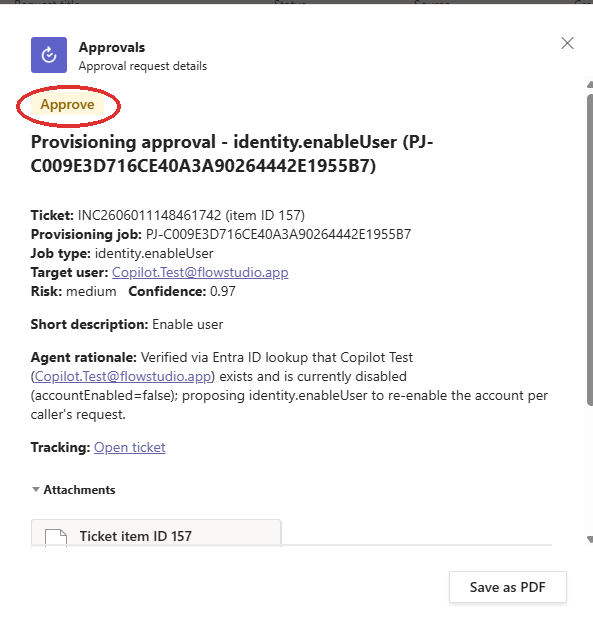
Figure: A manager approves the proposed action in one tap in Teams
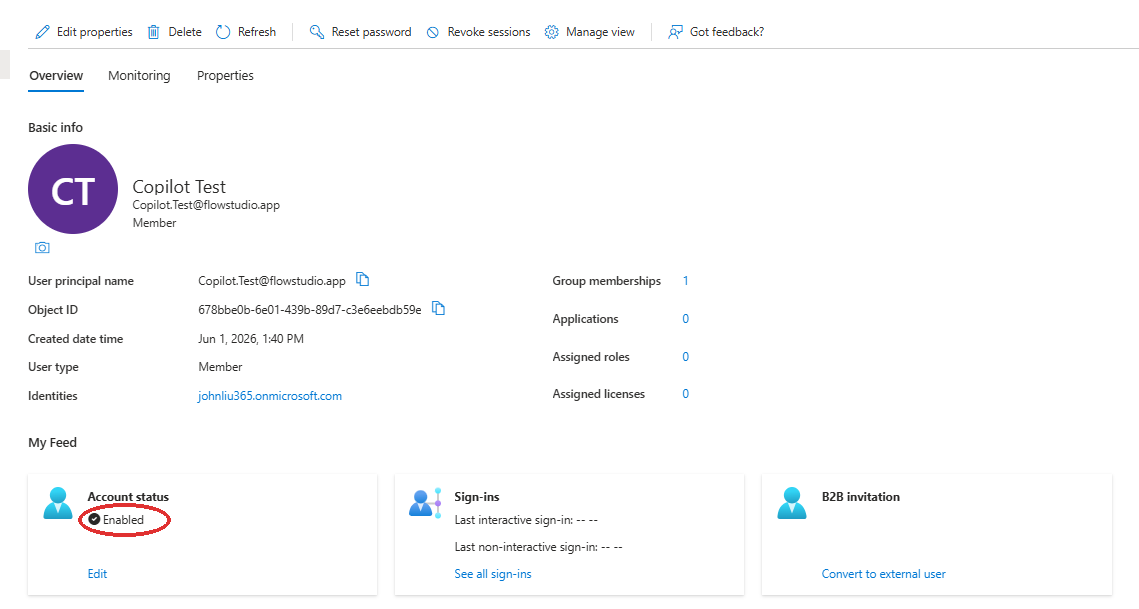
Figure: The scoped executor makes the real change: the user is now Enabled in Entra ID
The front end: a real SharePoint app, built by an agent
The portal isn't a SharePoint list form. It's a full-screen SPFx (SharePoint Framework) web part: a React single-page app (SPFx 1.22 / Heft / TypeScript) hosted on a SharePoint page, backed by a dozen-plus SharePoint lists. It follows the open-source vibe-sharepoint-template pattern, which treats SharePoint Online as a host for internal apps and hides the SharePoint chrome for an app-like feel. The instruction to the agent was essentially "point at this template and follow it."
One web part hosts the whole experience: a Home dashboard, a Service Catalog with item dialogs, a Knowledge Base, My Tickets and ticket detail, Approvals, an IT Service Desk hand-off queue, and an Admin view. A typed service layer (TicketService, CatalogService, ApprovalService…) reads and writes the SharePoint lists directly, read-only except explicit user actions, and no privileged Graph calls ever run in the browser. It ships as an .sppkg to the site-collection app catalog on /sites/ITSM through a certificate-authenticated GitHub Actions pipeline.
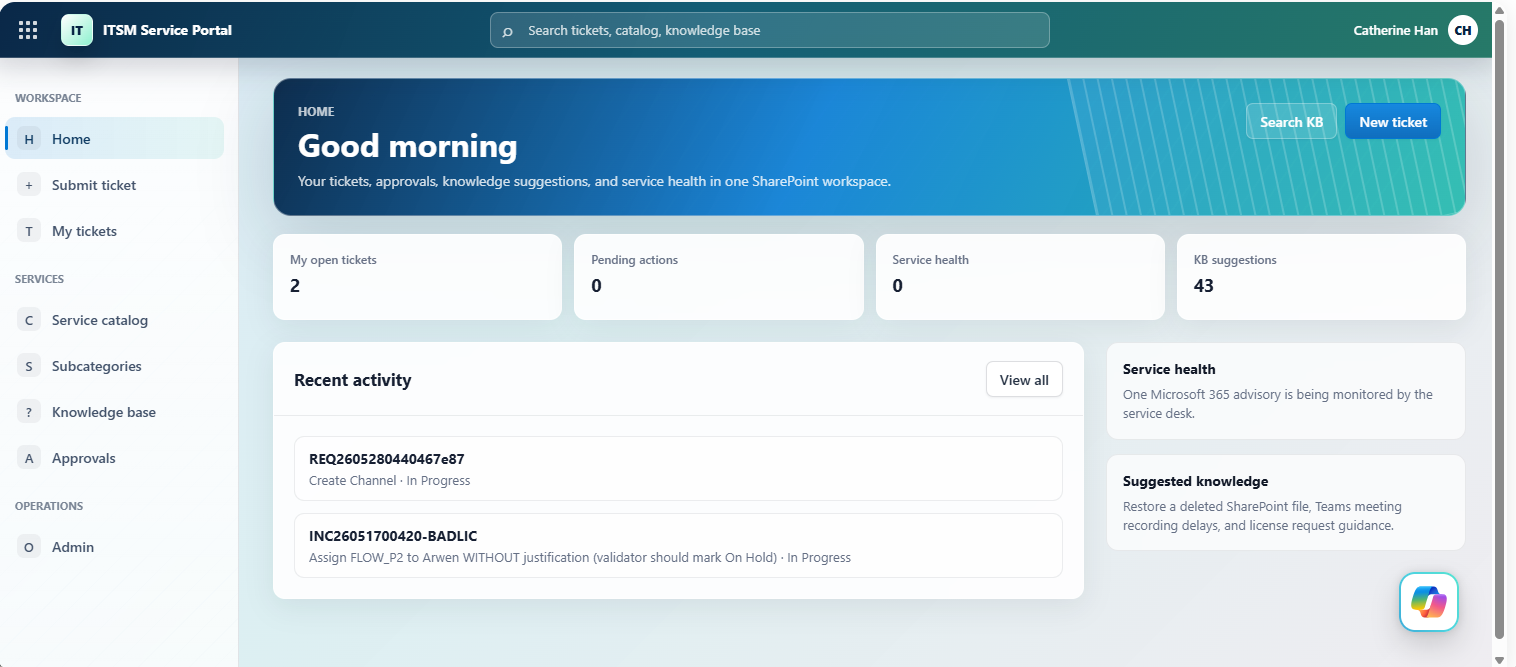
Figure: The ITSM Service Portal: open tickets, pending approvals, knowledge base, and service health
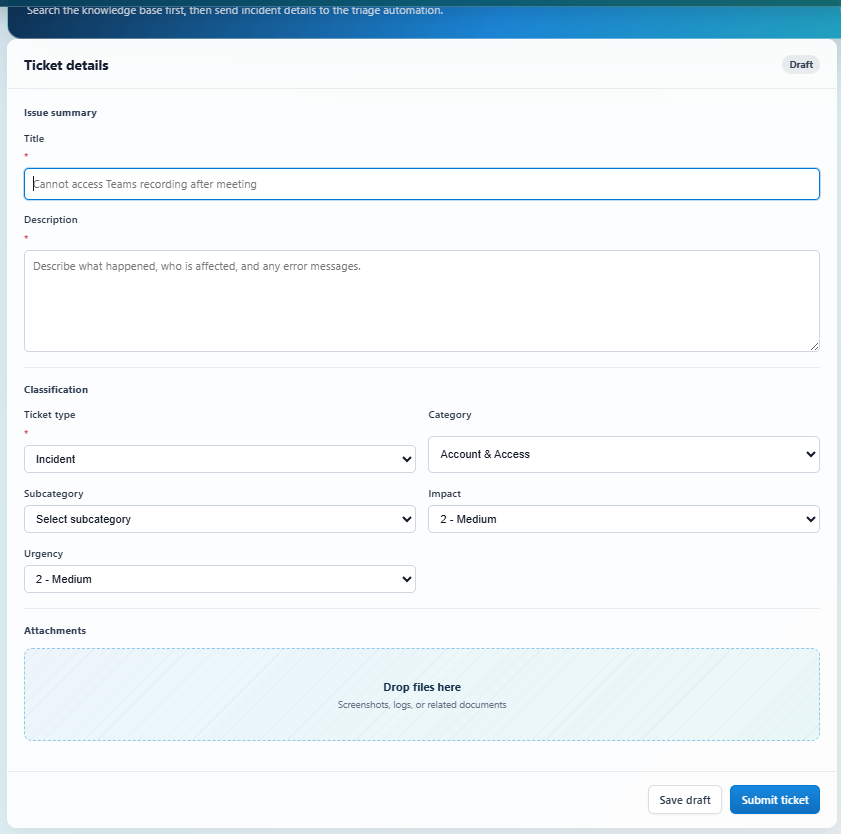
Figure: Submitting a ticket: on save it becomes a SharePoint row that triggers the pipeline
The notable part: this SPFx portal was built and shipped by AI agents, not a front-end team. An agent wrote the React/TypeScript, stood up the deployment pipeline, and from then on patched the portal's own source and shipped each change through CI/CD. A real production SharePoint app, built and maintained by agents under one person's supervision.
The build, phase by phase
This is the runbook view: how an agent (with you shepherding) actually stands it up. The constant here is FlowStudio MCP, not the agent: the flows are built, run, and debugged through the MCP server, and it works with Claude, Codex, GitHub Copilot, or Copilot Cowork. Use whichever agent you already work in. This build happened to use two: an IDE agent (Claude Code) and Copilot Cowork. The only real split is one capability boundary: authoring the Copilot Studio triage agent needs an IDE agent with the Copilot Studio extension; every other phase, either agent handles. The human directs and reviews.
- Tenant + tooling prereqs (~30 min). Pick the tenant and site URL; install the local tooling (PnP PowerShell, the Power Platform / SPFx toolchain). Nothing privileged yet.
- The provisioning identity (~10 min). Create one Entra app,
SP-IT-Provisioning, withSites.FullControl.All(application), a self-signed certificate uploaded to the app and stored locally for PnP, admin-consented. This is the only broad grant in the build, and it's used once, to create lists, not at runtime. No standing admin account. - SharePoint lists (~15 min). Run the PnP scripts in
infra/sharepoint/to create the 19 solution lists (Tickets, Service Catalog, Approval Policies, Provisioning Jobs, License Costs, Catalog Demand, and the rest) and seed the taxonomy. (IDE agent ran them here; Cowork can stand up the same schema a different way: a helper flow that creates each list through the SharePoint connector. Same schema, different mechanism.) - Triage agent + orchestrator (~45 min). (IDE agent, not Cowork.) Author the Helpdesk Triage agent in Copilot Studio from the topic and knowledge definitions in
agents/triage/. Wire the orchestrator flow that fires on a new ticket and calls the agent. - The flows, through FlowStudio MCP (~ ongoing). (Cowork and Claude Code both wrote flows.) Through the FlowStudio MCP server, the agents create the flows in
flows/: orchestrator, approval, dispatcher, and the six executors. Every flow was agent-written; none of the flow JSON was hand-authored. ~20 production flows ship in the repo (40-plus counting helpers and earlier iterations retired along the way). When a run fails, the agent reads the action-level outputs, confirms the bug, and patches the definition itself. - The scoped executors (~15 min each). One Entra app per executor (identity, groups, licensing, exchange, sharepoint, teams), each with a single Graph permission family. Secrets in Azure Key Vault; the Power Automate Key Vault connection reads them at runtime so no secret lives in a flow definition. (Detail on the permission model below.)
- The SPFx portal + CI/CD (~30 min). (One agent builds the app and the one-time pipeline; from then on, an agent patches the code and ships through it.) The IDE agent scaffolds the React app in
src/and stands up the deployment plumbing: a deployment Entra app, a certificate, the GitHub environment secrets, the site-collection app catalog, and thespfx-build-deploy.ymlworkflow. After that, an agent patches the portal's own code and pushes; the existing pipeline builds and deploys it. - Wire and test (~30 min). (Agent and human.) Connect the agent's action to the flow, then run one real request, "reset a password", end to end. The agent drives the test; the human approves the manager card in Teams; both confirm the change actually landed in the tenant.
The full version, covering every identity, the exact order, and the gotchas (Copilot Studio's flow binding needing a named solution is the one that bites everyone), is in the repo's IMPLEMENTATION-PLAYBOOK.md and DEPLOYMENT.md. Your agent reads those; you don't have to.
The self-healing loop: what FlowStudio MCP actually does here
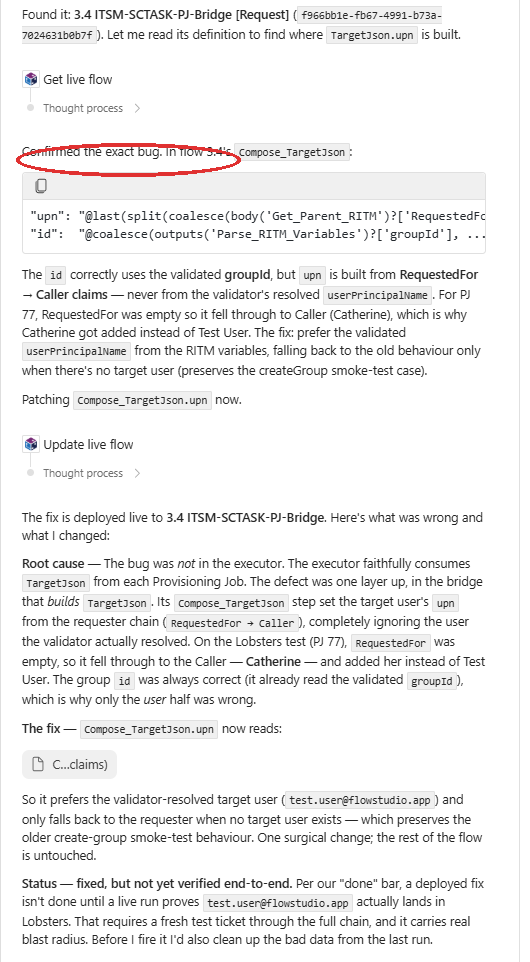
The "when a run fails, read the action outputs and fix it" line above is the whole reason an agent can build 30+ flows without a human in the JSON. The Power Automate Graph API only returns a top-level run status: "Failed." FlowStudio MCP gives the agent the action-level inputs and outputs of a live run, so it can see which action failed and why (a wrong field name, a type mismatch, an expired connection), then patch the definition and resubmit.
Click to view full size
Figure: An agent finds the bug in a live run and deploys the fix through FlowStudio MCP
That loop (get the live flow, confirm the exact bug from the run detail, deploy the fix) is what turns "agent generates a flow that probably works" into "agent ships a flow that does."
Reaching beyond Power Platform
Because the agent acts only through flows, it can reach anything Power Automate can, including systems outside the Power Platform. To patch the SPFx portal, an agent built a GitHub API proxy flow: one flow that commits files, opens branches and pull requests, merges, and runs and monitors GitHub Actions. It used that flow to ship the portal's own source through CI/CD without ever leaving Power Automate. That's the execution-layer idea in miniature: if a flow can reach it, the agent can act on it.
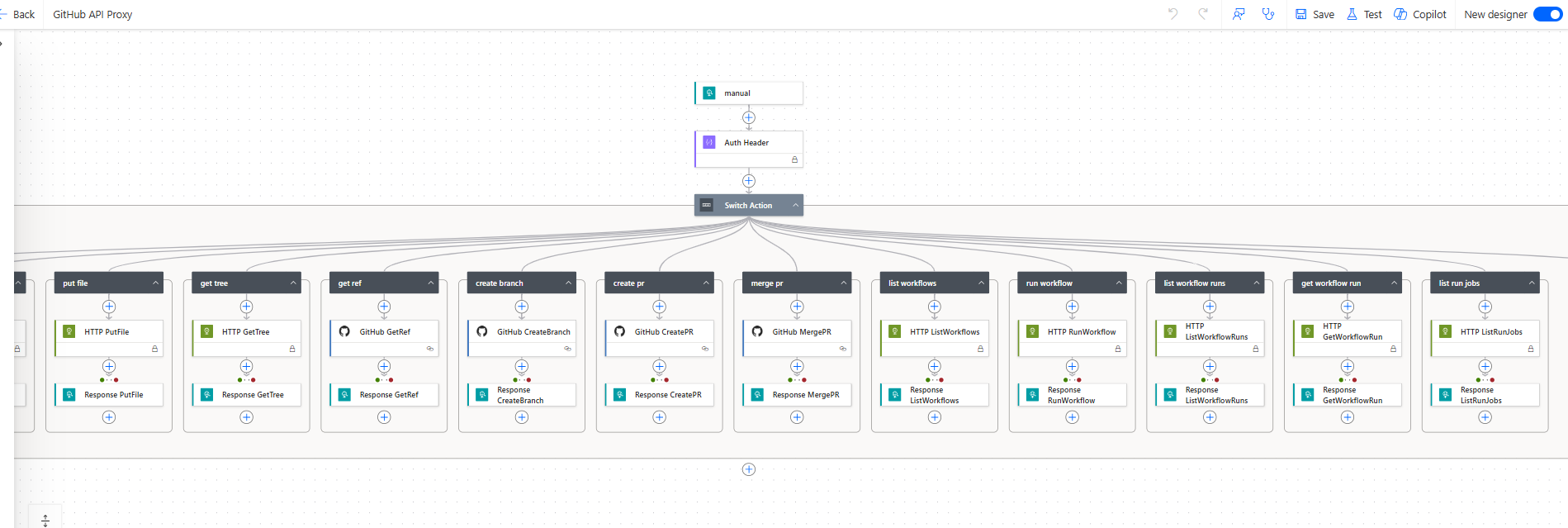
Figure: A GitHub API proxy flow: the agent commits, opens PRs, and runs GitHub Actions, all through a flow
An agent also handled the project management around the build: running on a schedule against its own task board and generating a documentation page for each flow it shipped. Useful for grinding through a backlog with light oversight, though not hands-off. Left alone for a week it drifted and needed a course-correct.
How it stays safe
The whole design assumes an AI is in the loop, so the guardrails are deliberate. Enforced in the pilot today:
- A human approves every privileged change. No auto-approve in v1: anything that writes to the tenant goes through a manager approval first. (A low-risk auto-approve path is designed and the data model reserves it, but it's deliberately switched off.)
- The privilege boundary is at the executor, not the agent. The triage agent is read-only; the dispatcher and approval flow hold no Graph write permissions. The power lives in six service principals, each covering one service area, so a compromised executor can only affect its own area.
- An immutable audit row per privileged action: a Provisioning Jobs record with requester, approver, timestamps, the Graph request ID, and the result.
- Idempotency keys stop a retried job from running the same change twice, and state commits only after the work succeeds, with no orphaned "approved but never done" records.
- A kill switch: a single SharePoint
Configrow the dispatcher checks on every job. Flip it and all execution freezes instantly: every job returns503before any tenant change, while intake, triage, and approvals keep working.
The six executors and their scopes:
| Executor | Service principal | Job-type prefix | Scope target |
|---|---|---|---|
| Identity | SP-IT-Identity |
identity.* |
Password Administrator for password/MFA; user lifecycle behind a higher approval tier. Never Global Admin. |
| Groups | SP-IT-Groups |
groups.* |
Constrained to an allow-list of managed groups. |
| Licensing | SP-IT-Licensing |
licensing.* |
Approved SKUs only; seat-count pre-check; revoke only the SKU requested. |
| Exchange | SP-IT-Exchange |
exchange.* |
Mailbox permission changes behind a cert-auth Azure Function with explicit Exchange RBAC. |
| SharePoint | SP-IT-SharePoint |
sharepoint.* |
Target Sites.Selected with explicit per-site grants. |
| Teams | SP-IT-Teams |
teams.* |
Narrow Graph channel/membership permissions plus a managed-team allow-list. |
The operating rule across all six: an executor rejects any job type outside its prefix, validates the target against an allow-list before any write, and logs target, job type, service principal, status, and correlation ID. The agent's output never passes a raw teamId or siteUrl straight to Graph.
What's not production-hardened (read this before you trust it)
The repo is explicit about the seams, and so am I. Designed and specced, but not yet wired in the pilot:
- Signed approval tokens. Today the dispatcher trusts a hard-to-guess signed trigger URL. Production has the approval flow mint a Key-Vault-signed JWT the dispatcher validates.
- Durable idempotency. The pilot's SharePoint-based idempotency check is race-vulnerable under truly concurrent callers; the production target is an Azure Table check with ETags.
- System-wide telemetry. Today the audit lives in the SharePoint row and Power Automate run history; Application Insights is provisioned but only lightly wired.
- Async hand-off. The dispatcher calls the matching executor directly over HTTP; the production target is a Service Bus topic with a per-executor subscription for durable, retryable hand-off.
- Pilot privilege posture. Some executors hold broader roles during the pilot than the target model (e.g. the Teams executor's admin role). The hardening guide lays out the path to
Sites.Selected, narrow Teams permissions, and certificate credentials with rotation.
None of that undercuts the claim that matters here: an agent reliably built 30+ real flows through FlowStudio MCP. But it's the difference between "ran end to end on my tenant" and "ship it to yours unchanged." Don't do the latter.
Try it
It's open source and genuinely agent-buildable. Point your AI coworker at the repo and tell it to build the system in your tenant: it reads everything there and stands it up, building and debugging the flows through FlowStudio MCP (works with Copilot, Claude, and any MCP-compatible agent), and comes back to you for the tenant, admin consent, and approvals. You don't grind through the docs; your agent reads them.
Repo: github.com/ninihen1/copilot-studio-itsm-agent. And if you want to see the other end of the same idea (an agent that fixes Power Automate flows instead of building them), see I built a flow that fixes failed Power Automate flows.
Give an agent action-level access to Power Automate and it stops generating demos and starts shipping production automation. That is what FlowStudio MCP does. Try it free at mcp.flowstudio.app.
This is an independent, open-source educational project, not affiliated with or endorsed by ServiceNow, Atlassian, Zendesk, or Microsoft. ServiceNow is a registered trademark of ServiceNow, Inc.; Jira and Jira Service Management are trademarks of Atlassian; Zendesk is a trademark of Zendesk, Inc. Microsoft, Microsoft 365, Copilot, Copilot Cowork, Copilot Studio, Power Automate, Power Platform, SharePoint, Teams, Exchange, Microsoft Entra, Microsoft Graph, and Azure are trademarks of the Microsoft group of companies. Names are used descriptively (nominative use). FlowStudio is not affiliated with or endorsed by these companies.