
ChatGPT for Power Automate with FlowStudio MCP
A flow failed overnight. Finding out why means opening the run, clicking into the failed action and expanding the inputs, and twenty minutes later it turns out one field was empty. Connect ChatGPT to Power Automate and it reads all that for you, then fixes the flow.
What ChatGPT can do with your Power Automate flows
ChatGPT has no access to Microsoft Power Automate on its own. You give it access by adding FlowStudio MCP, a connector that exposes around 20 Power Automate tools to it: list flows, read run history, open action-level inputs and outputs, build new flows, update broken ones, resubmit failed runs.
It runs in your browser
Most ways of connecting an AI agent to Power Automate assume you have a code editor open. GitHub Copilot needs VS Code. Claude Code needs VS Code or a terminal. Codex needs its desktop app and an API key.
ChatGPT needs none of that. If you build flows and have never installed a code editor, this is the easiest way to get an agent working on your flows.
What you need
- A ChatGPT account (free account is fine).
- A Microsoft 365 work or school account with a Power Automate license, the one your flows live under. A personal Gmail or Outlook.com account will not work because it has no business Power Automate.
No FlowStudio account needed beforehand. Signing in through the connector puts you on the free Starter plan: 100 calls over 21 days, no credit card.
Connect ChatGPT to Power Automate with FlowStudio MCP
- Turn on Developer mode under Settings > Security and login.
- Open Plugins in the left sidebar and click +.
- Leave the connection type on Server URL and paste this address:
https://mcp.flowstudio.app/mcp/oauth - Set Authentication to OAuth, tick the acknowledgment, and click Create.
- Sign in with your Microsoft work or school account and approve the Power Automate access.
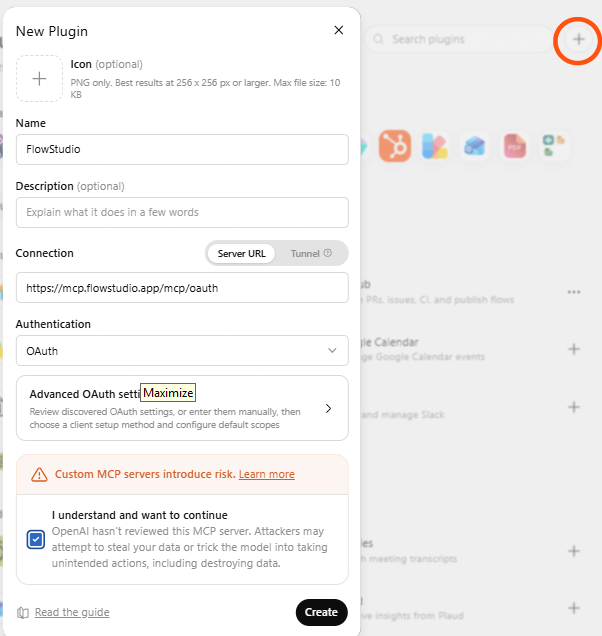
Figure: In the New Plugin dialog, paste the server URL and set Authentication to OAuth
The full walkthrough with screenshots covers each step, and the same address works for Claude at claude.ai.
ChatGPT flags developer mode as elevated risk. It shows that warning for any custom plugin it has not reviewed for its directory. We have submitted FlowStudio for review, and the developer mode step goes away once it is listed.
What to ask ChatGPT about your flows
| You ask | What happens |
|---|---|
| "List my Power Automate flows and tell me which failed this week" | Returns the flows and their recent run outcomes. |
| "Why did my HR Sync flow fail this morning?" | Opens the failed action and gives you the real error and the inputs behind it. |
| "Show me the inputs and outputs of the last Invoice Processing run" | Returns the action-level detail you would otherwise click through in the portal. |
| "Explain in plain English what my Approval Routing flow actually does" | Reads the definition and describes it step by step. |
| "Build a flow that posts to Teams when a new item is added to my Issues list" | Works out the connections, builds the flow, and deploys it. |
| "Fix the expression error in that flow and update it" | Patches the definition and saves it back to Power Automate. |
| "Resubmit yesterday's failed run" | Re-runs it with the same trigger data. |
What ChatGPT can see
You sign in on Microsoft's own pages. The Microsoft token stays with FlowStudio and is never given to ChatGPT. What ChatGPT gets is a FlowStudio key that only works against FlowStudio, and only for the account that signed in, so it cannot call Power Automate directly.
FlowStudio acts as you. It can only reach the flows and environments your own account can reach, every change is recorded against your name in Power Automate, and you can revoke access any time from mcp.flowstudio.app.
On Starter and Pro we never store your flow definitions. Every call goes straight to the Power Automate API.
ChatGPT or Codex for Power Automate?
Both are OpenAI products and both reach Power Automate through FlowStudio MCP.
- ChatGPT runs in the browser and you sign in.
- Codex is a desktop app and uses an API key you paste into a form. Better if you already work alongside files on your machine.
Start with ChatGPT if you are not sure. You can move to Codex later at no cost.
Frequently asked questions
Can ChatGPT work with Power Automate?
Not on its own. Add FlowStudio MCP as a custom connector using https://mcp.flowstudio.app/mcp/oauth and it can list your flows, read run history, inspect action-level inputs and outputs, build new flows, and fix broken ones.
How do I connect ChatGPT to Power Automate?
Turn on Developer mode under Settings > Security and login, open Plugins, click +, paste the address above as the Server URL, set Authentication to OAuth and click Create. Then sign in with your Microsoft work or school account.
Why does ChatGPT show an elevated risk warning?
It applies to every custom plugin not yet listed in the ChatGPT directory, not to FlowStudio specifically. FlowStudio has been submitted for that review and the step goes away once it is listed. Meanwhile your Microsoft token is never given to ChatGPT, FlowStudio reaches only the flows your own account can reach, and you can revoke access at any time.
Can ChatGPT tell me why my flow failed?
Yes. It reads the run history and opens the failed action to return the actual error and the inputs that caused it, including inside loops and child flows. The Graph API only returns top-level status, which is why agents without FlowStudio MCP usually cannot explain a failure.
Can ChatGPT build a Power Automate flow?
Yes. Describe what you want and it works out the connections, builds the definition, and deploys it. The flow appears in Power Automate already built.
Is it free?
FlowStudio has a free Starter plan: 100 calls over 21 days, no credit card. You also need a Microsoft 365 work or school account with a Power Automate license, which most business and enterprise plans include.
Does ChatGPT get access to my Microsoft account?
No. The Microsoft token stays with FlowStudio. ChatGPT holds a FlowStudio key that works only against FlowStudio and only for the account that signed in.
What is the difference between ChatGPT and Codex here?
ChatGPT connects in the browser with a sign-in. Codex runs as a desktop app and uses a pasted API key. For most Power Automate makers ChatGPT is the shorter path.
Is FlowStudio MCP affiliated with OpenAI or Microsoft?
No. FlowStudio MCP is an independent product made by FlowStudio. It is not affiliated with, endorsed by, or sponsored by OpenAI or Microsoft. It uses the open Model Context Protocol to talk to ChatGPT and the Power Platform API to talk to Power Automate.
Next steps
- Step-by-step setup with screenshots, for ChatGPT and Claude.
- Not sure which AI agent to use? Compare ChatGPT, Claude, Codex, Copilot Studio and the rest.
- Debug a failed flow once you are connected.
- Start free: 100 calls, 21 days, no credit card.
FlowStudio is an independent product and is not affiliated with, endorsed by, or sponsored by OpenAI or Microsoft. OpenAI and ChatGPT are trademarks of OpenAI. Microsoft, Microsoft 365, Power Automate, Power Platform and Copilot are trademarks of the Microsoft group of companies.