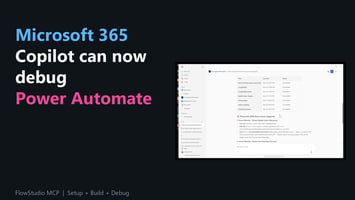
Microsoft 365 Copilot, calling get_live_flow_runs on a real Power Automate flow. Inspecting action...
I Told a Reddit User to Stop Learning Power Automate. Here's Why in 2026.
Yesterday a one-person business owner posted on r/PowerAutomate asking whether it was worth investing the time to learn Power Automate and SharePoint. They're on Mac, working mobile-first. They're running 50 active projects and already drowning in administrative work. Power Automate didn't stick when they tried it once, and they ended up paying for a third-party tool called relay.app for the one automation they got working.
What they really wanted to know was whether it was worth slogging through the learning curve, or whether they should just pay for yet another tool and accept the sprawl of eight monthly subscriptions. My answer was - do not learn it.
Disclosure up front: I replied to that thread because we build FlowStudio MCP, a Power Automate MCP server that fits exactly this situation. Take my advice for what it's worth, knowing I'm not disinterested.
Why I said "don't learn it"
Power Automate is a genuinely good product. For a developer who uses it every day, the learning investment pays back. But for a one-person business with 50 projects and no spare hours, the math just doesn't work out. Learning enough Power Automate to cover five task types well is a 40+ hour investment, and 40 hours is not something a solo operator has lying around. If they did, they probably wouldn't be asking the question in the first place.
The original poster had already tried the hard way. They described the designer as "stupidly user-unfriendly". They couldn't get a basic Outlook scheduling flow to work. They paid for a third-party tool to do the one automation they actually got working. That's the pattern of someone who has the right problem for low-code but is hitting the exact learning-curve wall that low-code was supposed to eliminate.
For a solo operator with real revenue responsibilities, there's a better path now that didn't exist 18 months ago.
The alternative: give an AI agent the keys to your Microsoft 365 tenant
Instead of learning Power Automate yourself, you hire an AI agent to learn it for you. Specifically: you give Claude or GitHub Copilot access to your Microsoft tenant through two complementary paths, and the agent now builds, deploys, debugs, and maintains the automations you need. You talk to the agent in plain English about what you want, and the agent does the Microsoft-specific work.
There are two paths, and you want both. They cover different surfaces of the Microsoft stack and complement each other:
- Path 1: FlowStudio MCP gives the agent action-level access to Power Automate (cloud flows, run history, deploy operations, triggers, action inputs and outputs). Sign-up is browser-based. The agent uses an API key from the FlowStudio MCP dashboard and never touches your Microsoft credentials directly.
- Path 2: Azure CLI + an app registration + service principal gives the agent broad access to the rest of the Microsoft stack (SharePoint, Microsoft Graph for Outlook and Teams, Microsoft Forms, OneDrive, Azure resources like Static Web Apps or SQL). You install the Azure CLI once, sign in as yourself, then have the agent create a scoped service principal for itself. The agent uses the client ID and secret for all non-Power-Automate work going forward.
Path 1 handles scheduled and triggered automations.
Path 2 handles data setup, schema changes, and everything outside Power Automate.
Setup, start to finish (about 30 minutes, no code)
Path 1: FlowStudio MCP for Power Automate
- Pick an AI agent. Claude Opus is my pick. You can access it directly through a Claude Pro subscription (the CLI tool called Claude Code is included with Claude Pro), or through GitHub Copilot Pro which gives a good range of LLM models to select from, including Claude. I personally use VS Code to access both Claude Code and GitHub Copilot (have both subscriptions), but Claude CLI and the Claude desktop app work as well.
- Sign up for FlowStudio MCP and grab your API key. Head to mcp.flowstudio.app, sign up for the Starter plan (100 evaluation calls over 21 days, no credit card), connect your Power Platform permission, and copy your API key from the dashboard.
- Configure FlowStudio MCP in your agent. Point your agent at
https://mcp.flowstudio.app/mcpas an MCP server and paste your API key as the authorization header. Claude and GitHub Copilot each have a configuration file for MCP servers (the FlowStudio MCP docs cover the exact syntax for both) - more details on https://learn.flowstudio.app/mcp-getting-started. Five minutes, no code.
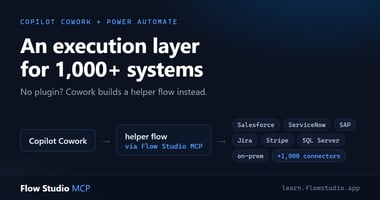
Once configured, your agent can call any of the ~15 live Power Automate tools FlowStudio MCP exposes: list_live_environments, list_live_flows, get_live_flow, get_live_flow_runs, get_live_flow_run_action_outputs, update_live_flow, trigger_live_flow, and more.
Path 2: Azure CLI + service principal for everything else
A quick terminology primer before the steps, because these concepts trip people up and they aren't the same thing:
- Azure CLI (the
azcommand) is a command-line tool you install on your machine. It is not an identity. You authenticate it as a user or as a service principal. - An app registration (leave this for the agent to create after Azure CLI) is a global application identity created in Microsoft Entra ID (formerly Azure Active Directory). It's the blueprint that represents your agent as an application in the Microsoft identity system.
- A service principal is the local instance of that app registration inside your tenant. It's what actually holds role assignments and can authenticate to Azure and Microsoft 365 resources.
Creating an app registration in your tenant automatically creates the matching service principal. The Azure CLI has a single command that does both in one step, which is why you'll see "create a service principal" and "create an app registration" used almost interchangeably in the wild.
- Install the Azure CLI. One command from Microsoft's install docs. Works on Windows, Mac, Linux.
- Sign in as yourself. Run
az loginin a terminal. A browser window opens for interactive sign-in. Do this once as the actual human who owns the tenant. - Have the agent create a scoped app registration. Ask your AI agent in plain English to create the app registration. Tell the agent what Microsoft services you plan to get the agent to work on (SharePoint, Forms, etc.) so it creates the correct scope. If the agent comes back with questions such as "what is your tenant ID" or "I need this resource", remind the agent that it has Azure CLI access to work this out. Once that's done, the agent can also grant the API permissions on your behalf.
- Have the agent create credentials to your app registration. Via Azure CLI, the agent can create and see the secret on your behalf though the secret would appear only once. Ask the agent to add them to the agent's environment (exact method depends on which agent, but every AI CLI has a way to persist environment variables).
Now your agent has two toolkits available: FlowStudio MCP for Power Automate (via the MCP API key) and Azure CLI for everything else (via the service principal credentials). Describe your task in plain English and the agent usually picks the right path.
What this actually looks like for a 50-project solo business
The original poster listed five concrete automation needs. Here's how each one gets handled, and which path the agent uses:
| Your task | How the agent handles it | Path |
|---|---|---|
| New project intake. Generate 3 documents from a template, email one to the client. | Agent builds a Power Automate flow triggered by a new row in your project list, uses Word Online to populate your DOCX templates, and sends the client email via Outlook. Agent writes the flow once via update_live_flow, you use it forever. |
Path 1 (FlowStudio MCP) |
| Quarterly reports. Fill a template for 50 projects on the last day of each quarter. | Scheduled Power Automate flow triggered at the start of the quarterly date. Iterates the project list, fills the template per project, drops the filled docs in a SharePoint folder. | Path 1 (FlowStudio MCP) |
| Relational database. Somewhere to store projects, clients, deadlines. | Agent sets up a SharePoint list with the schema you describe (via Microsoft Graph using the service principal), imports your Airtable CSV in one go, then maintains the list via Power Automate flows for ongoing writes. | Paths 1 + 2 |
| Scheduling milestones. Auto-create pre-deadline calendar events when you schedule a project completion date. | Agent builds a Power Automate Outlook Calendar flow. Because the agent can iterate with full API visibility via get_live_flow_run_action_outputs, it catches the edge cases that were breaking your manual attempt. If you want to keep relay.app for comparison, the agent can also talk to relay.app via its API. |
Path 1 (FlowStudio MCP) |
| Client email capture. Save client emails to the client's SharePoint record. | Two options. The simple one: Power Automate Outlook trigger plus a SharePoint action to save the email as a list item. The flexible one: the agent calls Microsoft Graph directly to filter client mail by sender, parse key fields, and write structured rows into the SharePoint list via the service principal. | Path 1 or Path 2 |
The underlying products are the same whether you learn them or whether the agent drives them for you. The difference is whether you build them by hand over a weekend, or whether an agent builds them in 20 minutes while you describe what you want.
The meta point
One-person businesses don't scale by learning more tools. They scale by giving agents access to tools. The lever isn't your learning time, it's the leverage you get from pairing an AI agent with the right MCP servers and the right service principal credentials.
This is true beyond Microsoft. The same pattern works for Stripe (plug in a Stripe MCP server and give the agent API keys), for GitHub (give the agent a fine-grained personal access token), for any API the agent can call. Model Context Protocol is one piece of plumbing that makes this approach generalizable. Direct API access via service principals or scoped tokens is another. FlowStudio MCP is the one we built, because Power Automate is where we saw the biggest gap between "an agent could theoretically drive this" and "an agent can actually drive this reliably". But the pattern isn't specific to FlowStudio. Any custom MCP server works the same way.
The small business version of this story is: you do not need to become a Power Automate developer or an Azure administrator. You need to become someone who pairs an agent with the right credentials and describes what they want in plain English.
Honest caveats
Three honest caveats:
- Some one-time setup still needs your hands. The FlowStudio MCP signup is browser-based. The Azure service principal setup needs one interactive
az loginfrom you. And for Power Automate flows specifically, the agent cannot create connections on your behalf. Microsoft does not expose the connector OAuth consent flow to programmatic clients, so for each type of connection you want your flows to use (SharePoint, Outlook, Teams, and so on) you will need to create it once yourself in the Power Automate portal UI. Once the connection exists, the agent can reference it from every flow it builds. None of these are long, but the agent can't click them for you. - Some UI-only operations don't have APIs yet. The agent can't drag boxes around in the Power Automate designer. It can create the flow programmatically via
update_live_flow, which produces the same result, but if you ever want to see the graph view you'll open the designer yourself. For 95% of what a solo business needs, you never have to. - Scope the service principal narrowly. By default the agent will probably create the service principal with Contributor access to your entire subscription, which is fine for a solo business with one subscription. If you grow into multiple subscriptions or start handling client data, tell the agent to scope the service principal to specific resource groups or use Graph API permissions at the operation level. You can always revoke the app registration and create a tighter one from the Entra ID portal.
Try it yourself
If you want to test this approach before you commit:
- Sign up for a free FlowStudio MCP Starter trial. 100 calls, 21 days, no credit card.
- Install GitHub Copilot Pro or Claude Pro if you don't already have one.
- Follow the Getting Started guide to connect the agent to the MCP server.
- (Optional for broader access) Install Azure CLI, run
az loginas yourself, ask your agent to create a scoped service principal for further Microsoft 365 and Azure work. - Pick the smallest automation task on your list (the one that's been annoying you for months) and tell the agent exactly what you want. See what it builds.
30 minutes from "I should automate this" to "it's automated". That's the scale of time cost I'd recommend to someone who said they had none to spare.
And if it works for the small task, do the same thing for the next one. The point is not to learn Power Automate. The point is to delegate Power Automate to an agent that already learned it, and to give that same agent the keys to the rest of your Microsoft 365 stack so you never have to build anything by hand again.
About FlowStudio MCP: FlowStudio MCP is a Model Context Protocol server that gives AI agents action-level access to Power Automate. It's listed on GitHub's awesome-copilot, the Microsoft-maintained list of recommended skills for AI coding agents. Works with Microsoft Copilot Studio, GitHub Copilot, Claude, and any MCP-compatible agent.
Related reading:
- Vibe code Power Automate flows with AI agents
- Getting Started with FlowStudio MCP
- How to Plug a Custom MCP Server Into Microsoft Copilot Studio in 5 Minutes
- Debugging Power Automate Flows with an AI Agent
- The Dictionary Pattern for AI-Built Power Automate Flows
Catherine Han, FlowStudio