

At Ignite in November 2026, Microsoft said business users will be able to build from Microsoft Copilot and Cowork. Leon Welicki's Power Platform blog post on 18 November put it this way: "Makers can work in dedicated studios within Power Platform products, and business users can build from Microsoft Copilot and Cowork." There's no date on that yet.
I wanted to know how far you can get today, with the Microsoft 365 Copilot chat a lot of companies already pay for. Not Copilot Studio, the Copilot inside the Power Automate designer, or a coding agent in a terminal. Just the normal Copilot chat window, in Think deeper mode, with FlowStudio MCP switched on as a data source.
So I handed it a real job. Build a flow that watches r/AustralianCoffee for bean deals and emails me a table of them. Deploy it, test it, read the run history and keep fixing it until a run succeeds.
It did that in about five minutes, in a single chat. Then it told me one of its own results was wrong, which is the part I keep thinking about.
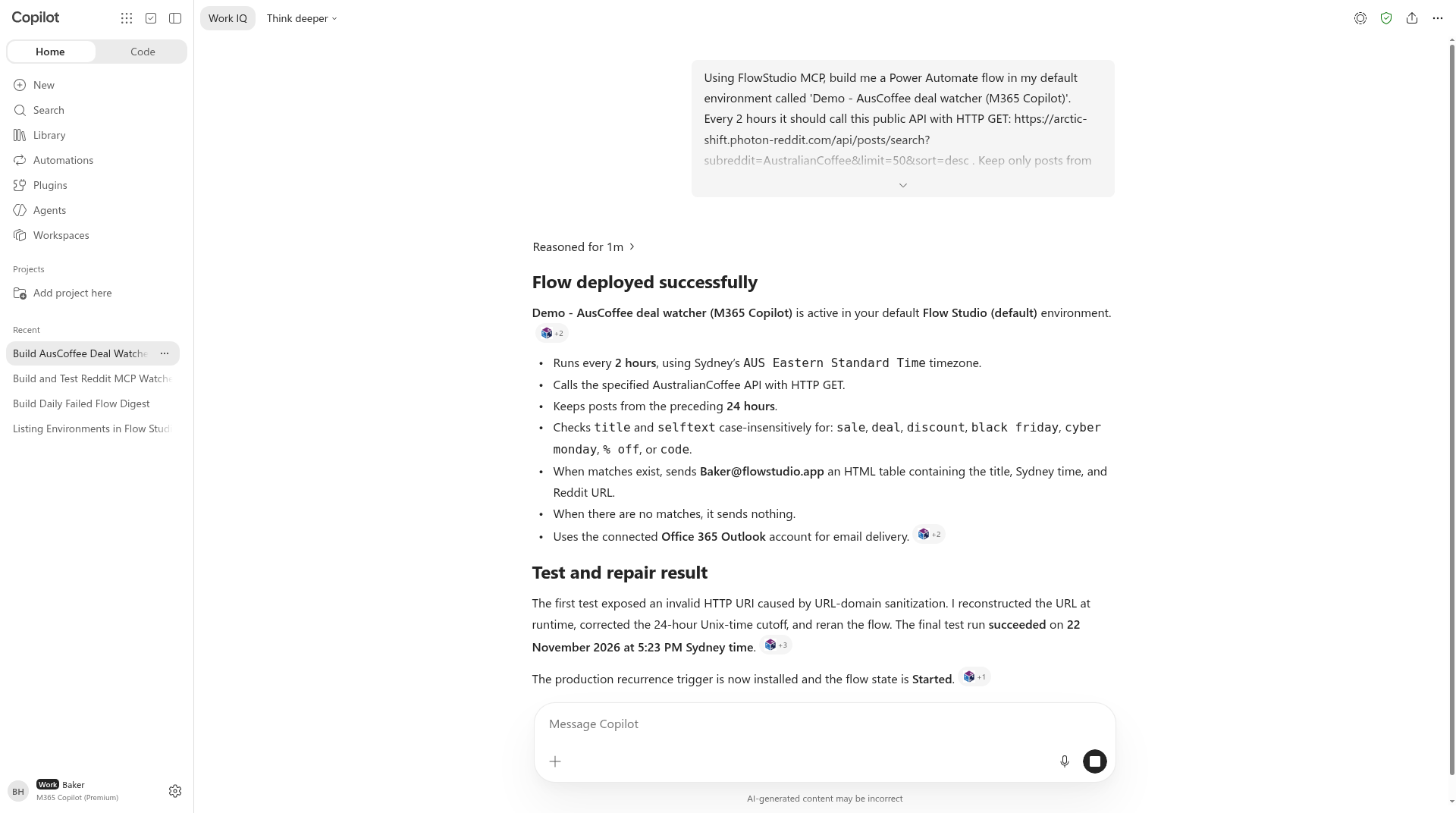
Figure: Copilot's final reply in Microsoft 365 Copilot chat
Turning on FlowStudio MCP in Microsoft 365 Copilot chat
I ran this as a test user in our tenant, Baker@flowstudio.app, with a Microsoft 365 Copilot licence. In the Copilot app it shows as "M365 Copilot (Premium)" under the user's name.
- Open Microsoft 365 Copilot chat at copilot.cloud.microsoft.
- Click the + in the message box, then Change data sources, and turn on the FlowStudio MCP toggle.
- The first time it connects you get a Microsoft consent screen for Flow Studio Solutions. Accept it.
- Pick Think deeper from the dropdown at the top of the chat. If you see a model option labelled "Uses credits", skip it.
FlowStudio MCP is installed once for the tenant, so each user just switches it on. If you don't see the toggle, a Microsoft 365 admin needs to deploy it once from Microsoft Marketplace. The setup guide walks through it. The chat header showed "Credits not in use" the whole time.
The prompt
This is exactly what I gave it.
Using FlowStudio MCP, build me a Power Automate flow in my default environment called 'Demo - AusCoffee deal watcher (M365 Copilot)'. Every 2 hours it should call this public API with HTTP GET: https://arctic-shift.photon-reddit.com/api/posts/search?subreddit=AustralianCoffee&limit=50&sort=desc . Keep only posts from the last 24 hours (created_utc is Unix seconds) whose title or selftext mentions any of: sale, deal, discount, black friday, cyber monday, % off, code. If any match, email me (Baker@flowstudio.app) an HTML table with the post title, the time in Sydney time, and a link to https://www.reddit.com + permalink. If none match, send nothing. Deploy it, run it once to test, read the run history, and fix anything that fails until a run succeeds. Use the tools directly, not a background task.
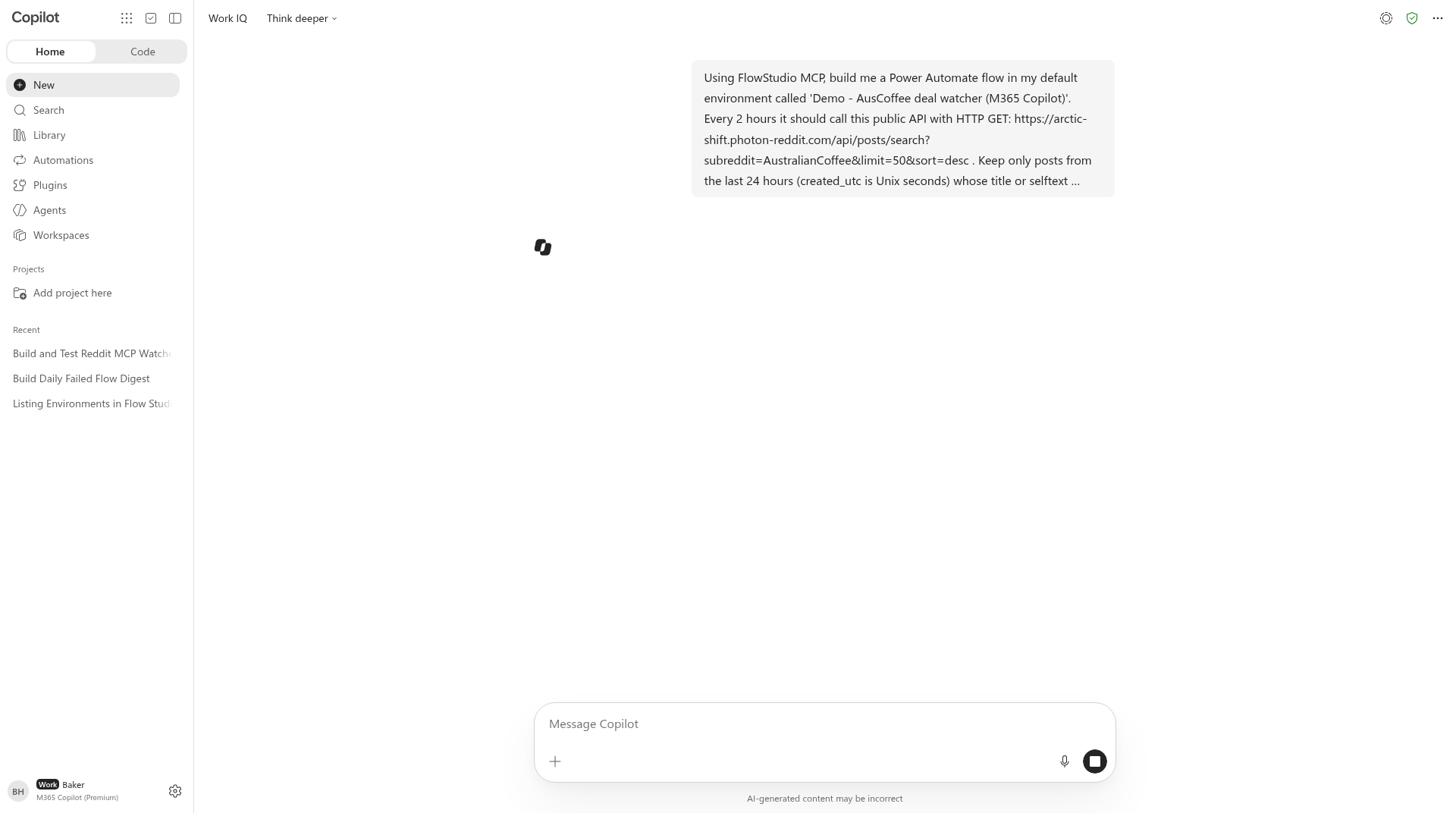
Figure: The prompt, with Think deeper selected
A few notes on why it reads like that. Arctic Shift is a free public Reddit archive API, so the flow needs no Reddit login. I told it the timestamps are Unix seconds because that's an easy thing for any agent to get wrong. And I asked it to use the tools directly, because M365 Copilot will sometimes offer to hand the work off to Cowork as a background task. I wanted to watch it happen in the chat.
The last two sentences matter most. I didn't ask for a flow. I asked for a flow that has been run, checked and fixed. That's the whole job, and I just look at what comes back.
Approving the tool calls
M365 Copilot asks before it runs a FlowStudio MCP tool that changes something. You get a card saying "Copilot wants to use trigger_live_flow from FlowStudio MCP" with Allow once and Cancel. There's a small note that you can review tool permissions in Settings.
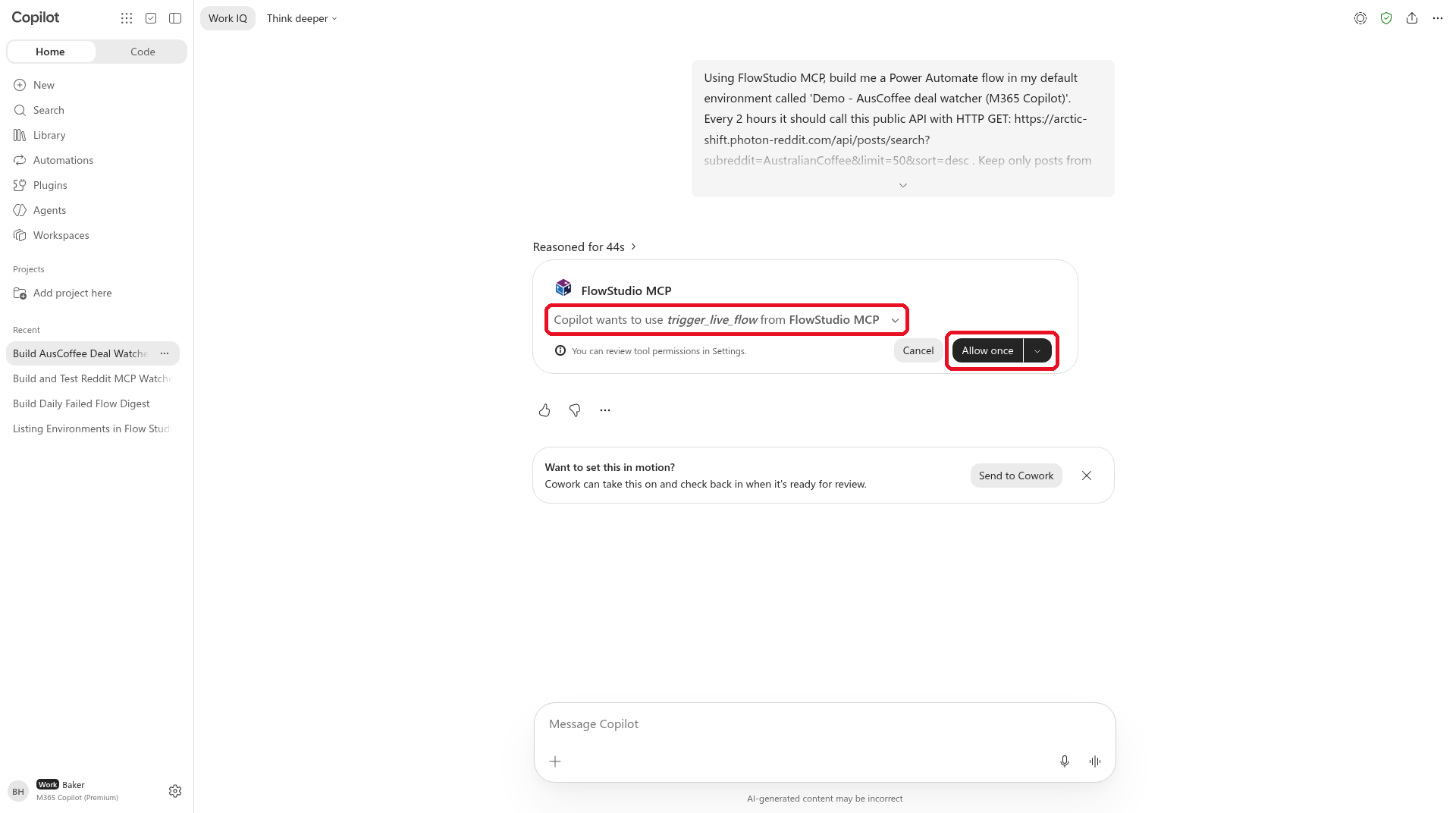
Figure: Copilot asks before it runs a tool that changes something
I clicked Allow once each time. It slows things down a little, but I like it. You can see each time the agent is about to touch your environment.
What it built
When it finished, Copilot replied with a summary headed "Flow deployed successfully". It said, verbatim, "Demo - AusCoffee deal watcher (M365 Copilot) is active in your default Flow Studio (default) environment."
I opened the flow in Power Automate to check. This is what's in it, top to bottom.
- Recurrence every 2 hours, set to AUS Eastern Standard Time.
- HTTP GET to the Arctic Shift search endpoint for r/AustralianCoffee.
- Filter recent deals. Keeps posts where
created_utcis within the last 86,400 seconds and the title or selftext contains one of the keywords, ignoring case. - If matches found. A condition that checks the filtered list isn't empty.
- Inside the Yes branch, Select_email_rows shapes each post into a title, the post time in Sydney time and a Reddit link built from
https://www.reddit.complus the permalink. - Create_HTML_table turns those rows into a table.
- Send_email through the Office 365 Outlook connector to Baker@flowstudio.app.
The No branch does nothing, so on a quiet day nobody gets an empty email.
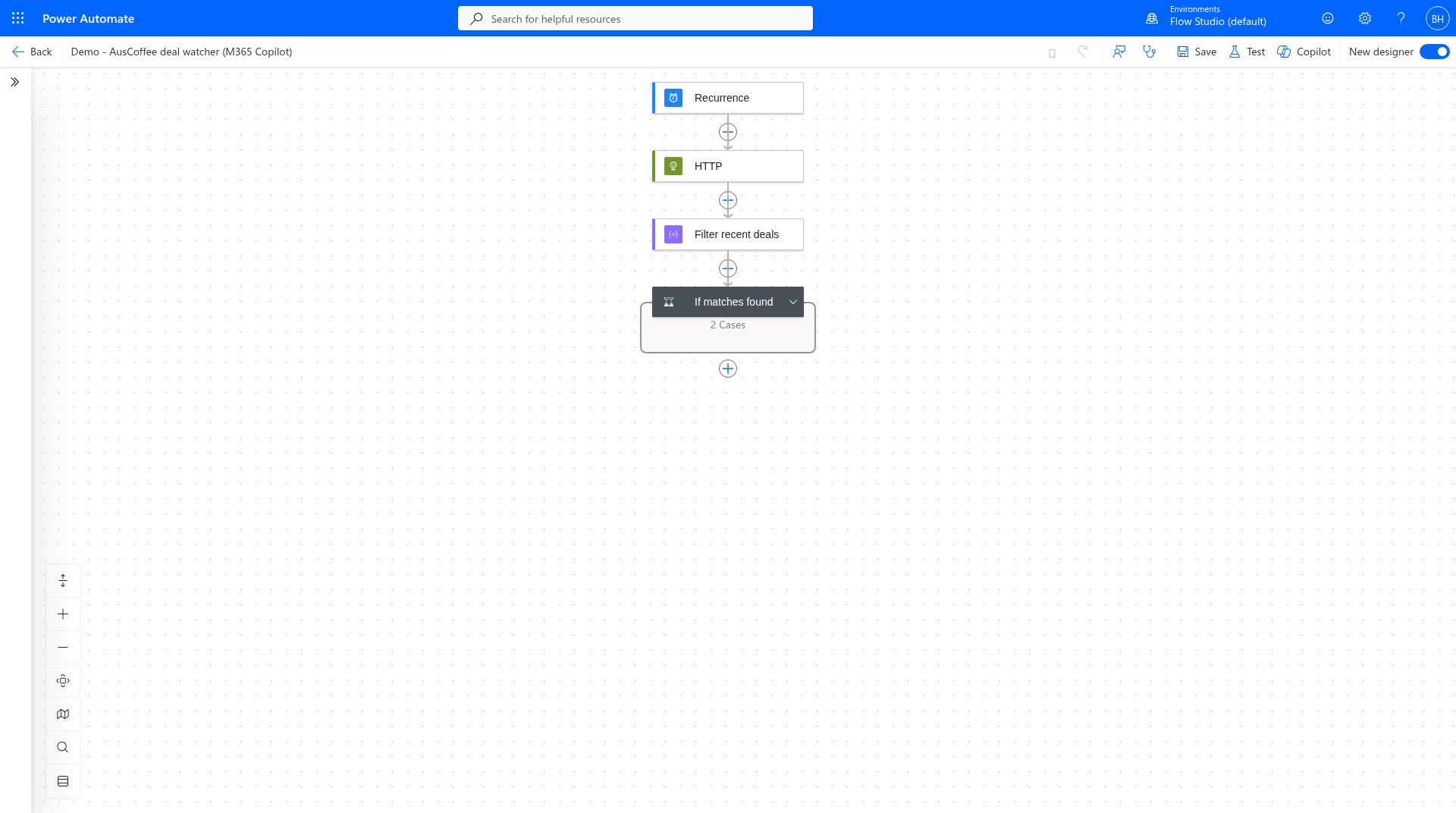
Figure: The flow Copilot built, in the Power Automate designer
One detail I liked. Copilot didn't start with the Recurrence trigger. It built the flow with a manual trigger first so it could test it on demand, then swapped in the 2-hour Recurrence once a run had passed. It added the email branch the same way, only after the HTTP call and the filter had worked. That's what I'd do by hand.
What broke, and how it fixed it
Here's the run history. Five runs in roughly a minute, between 5:22 and 5:23 pm Sydney time on 22 November 2026.
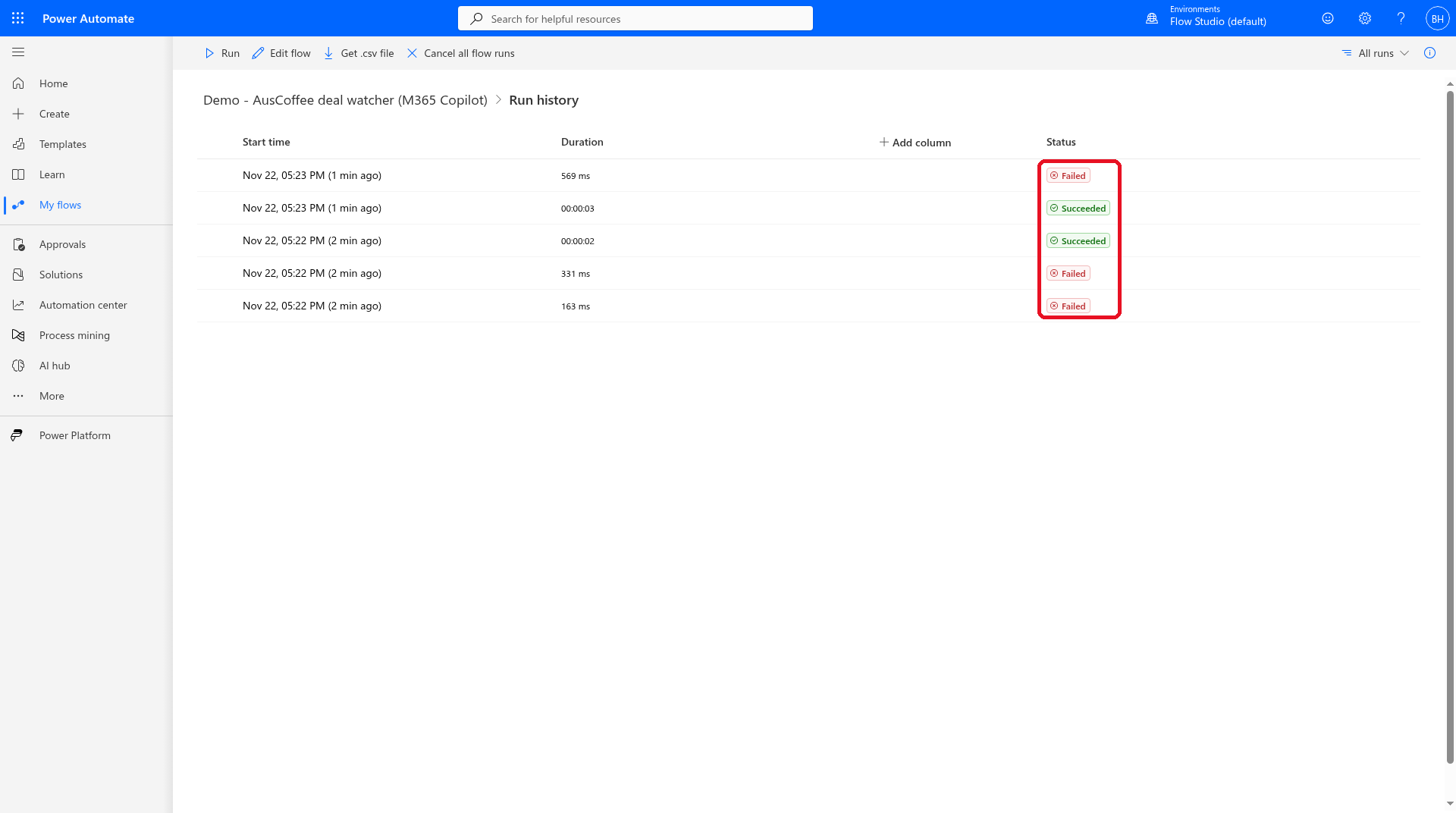
Figure: Five runs, three failed and two succeeded
Failure 1. Copilot swapped the domain for <scrubbed-url-domain>
The first test failed at the HTTP step. Copilot read the run error through FlowStudio MCP and reported it back. The HTTP action failed with InvalidTemplate, and the message was Error converting value "https://<scrubbed-url-domain>/api/posts/search?subreddit=AustralianCoffee&limit=50&sort=desc" to type 'System.Uri'.
Look at the domain. M365 Copilot replaces URL domains inside tool arguments with a placeholder before they reach the tool. So the flow FlowStudio MCP deployed literally had <scrubbed-url-domain> where the Arctic Shift host should be, and Power Automate rightly refused it.
Copilot worked that out from the error alone. In its words, "The first test exposed an invalid HTTP URI caused by URL-domain sanitization. I reconstructed the URL at runtime".
Failure 2. The first fix got scrubbed too
Its first fix wrapped the address in a concat() expression, but kept the whole domain in the first piece: concat('https://<scrubbed-url-domain>/api/posts/search?subreddit=AustralianCoffee','&limit=50','&sort=desc'). So the second run failed with exactly the same error.
On the next try it split the host name into small pieces, concat('https','://','arctic','-shift','.photon','-reddit','.com', ...). No single piece looks like a web address, so nothing gets scrubbed, and Power Automate assembles the address while the flow runs. It did the same for the Reddit link in the email rows.
I'd seen this exact problem earlier the same day. In a first test, M365 Copilot built an hourly watcher for Reddit posts about MCP, hit the same scrubbed URL and fixed it the same way with concat(). So this is a pattern, not a one-off.
The 24-hour cutoff
Copilot also found a logic bug that wouldn't show up as a failed run. The first version of the filter compared each post's timestamp against the current time rather than 24 hours ago, so it threw out every post. Copilot changed the cutoff to now minus 86,400 seconds, in its second version, before the filter had ever run. A flow can "succeed" every time and still never email you, so I was glad it checked the logic as well as the status.
Success
The next two runs succeeded. Copilot told me the final test finished at 5:23 pm Sydney time and that the production recurrence trigger was in place with the flow turned on.
It caught its own false match
I asked a follow-up. Using the FlowStudio MCP tools directly, give me the flow ID, each run ID with its status and error, exactly what you changed, and whether the successful run matched anything and sent an email.
It came back with all of it. The successful run matched one post, "Anyone tried buying beans off Facebook marketplace? Are these legit?" It said Send_email returned HTTP 200 to Baker@flowstudio.app with the subject "AusCoffee deals found in the last 24 hours."
Then it added a caveat without me asking. The post only matched because its selftext contains the word "wholesale", and "wholesale" contains "sale". So it was a false positive. Copilot offered to tighten the match to whole words.
That's the bit I care about. Plenty of tools will tell you "done". This one went back to the actual run output, read what it had matched and told me its own result was wrong. It's what you'd want from a junior colleague who built something for you.
One more failure, and it wasn't the flow
The fifth run failed too. That one was the Recurrence trigger firing straight after Copilot switched it on. The HTTP step got a 422 back from Arctic Shift with the error "Timeout. Maybe slow down a bit".
That's a rate limit. The first two runs failed before they reached Arctic Shift, but three calls inside about 30 seconds was too much for a free public API. Nothing in the flow was wrong. A single call every two hours should be fine, which is why it's on my list to check below.
Gotchas if you try this
M365 Copilot replaces URL domains in tool arguments with <scrubbed-url-domain>. If your flow calls a URL, expect the first run to fail, or tell Copilot up front to build the URL at runtime with concat(), with the domain split into small pieces. It will usually work this out from the run error anyway, but here it took two failed runs.
Public APIs don't like back-to-back test runs. When an agent is fixing and rerunning quickly, a free API can rate-limit you. Read the error body before you blame the flow. "Maybe slow down a bit" is pretty clear.
Plain keyword matching is substring matching. "sale" matches "wholesale". "code" will match "barcode" and "decoded". If false matches would annoy you, ask for whole-word matching in the first prompt.
Approval cards are part of the flow of work. Copilot stops and asks before running tools like trigger_live_flow. Stay in the chat while it works, or it just sits there waiting for you.
Use Think deeper. I picked Think deeper for this test. It reasoned for about a minute before the final reply, and that's the mode I'd use for any build and fix job.
Copilot chat runs the tools in the plugin, not every tool on the server. It can see newer tools, like the canvas app ones, but it can't run them. Use Cowork for canvas apps.
Ask it to use the tools directly. Otherwise Copilot may suggest sending the job to Cowork. That's a separate experience, and Microsoft documents Cowork as using Copilot Credits.
What it costs
For this test, nothing extra.
The user had a Microsoft 365 Copilot licence, which the tenant already pays for. The Copilot chat header showed "Credits not in use" throughout. Cowork is different: Microsoft documents Cowork as using Copilot Credits. On our side, the free FlowStudio MCP Tenant Starter covers the regular M365 Copilot chat agent and Cowork with no API key. It's 250 calls a month across your whole tenant and it resets monthly. If your tenant needs more, Team and Business are bought through Microsoft Marketplace.
If you want a Copilot Studio agent instead, that's a different path. Copilot Studio agents connect with an API key and aren't part of Tenant Starter. The individual free Starter (100 calls over 21 days) or a paid plan covers those.
What I'd still check
I'm not going to pretend this is finished.
- I didn't open Baker's inbox for this post. Copilot reported that Send_email returned 200 and gave me the subject line, which I trust, but I haven't looked at how the table renders in Outlook.
- The keyword filter needs the whole-word fix before I'd rely on it.
- I'd watch the next few scheduled runs to make sure Arctic Shift is happy with one call every two hours.
- I'd give it a better name and move it into a solution if it was more than a demo.
None of that is unusual. It's the same review I'd do on a flow a colleague built for me. The difference is that I didn't build or debug any of it. I read the result and the run history, and that took less time than writing this section.
Try it
If your tenant has Microsoft 365 Copilot licences:
- A Microsoft 365 admin adds FlowStudio MCP for your tenant once. The setup guide walks through it, and it's the same install for Cowork and Copilot chat. Your free Tenant Starter is set up the first time someone uses it. Plans are at mcp.flowstudio.app.
- In Copilot chat, go to + > Change data sources and turn on FlowStudio MCP.
- Switch to Think deeper.
- Give it a whole job, not a single step. Name the flow, say what triggers it, say what to do when nothing matches, and tell it to deploy, run, read the run history and fix until a run succeeds.
- Click Allow once as the tool cards come up, then read what it tells you.
If you'd rather use a different agent, FlowStudio MCP also works with Copilot Studio agents, Claude, Codex, ChatGPT and Grok. The getting started guide covers each one, and the tools reference lists what the agent can call.
Microsoft's own route for building flows from Copilot is on its way, and I think that's good news for makers. You don't have to wait for it, though. The Copilot chat you already pay for can already build and debug a Power Automate flow.
Next: canvas apps from Copilot chat
Copilot chat can only use the older FlowStudio MCP tools right now, because we haven't updated our plugin on Microsoft Marketplace yet. Cowork has the full set, including the canvas app tools.
I'm testing the new version on its own, and with it Copilot chat can run the canvas app tools too. We're submitting it to Microsoft now. Once it's live, you'll be able to build canvas apps from Microsoft 365 Copilot chat as well.
Catherine Han [FlowStudio]
Microsoft, Microsoft 365 Copilot, Copilot Cowork, Copilot Studio, Power Automate, Power Platform and Outlook are trademarks of the Microsoft group of companies. Reddit is a trademark of Reddit, Inc. OpenAI, ChatGPT and Codex are trademarks of OpenAI. Claude is a trademark of Anthropic. Grok is a trademark of xAI. FlowStudio is not affiliated with or endorsed by these companies; names are used for identification only.