How do I document my Power Automate flows? It comes up in every Power Platform community forum I...
How a Reddit question became a one-hour exercise in knowing when to pivot.
Updated 2026-04-24: The OP came back with a tighter constraint: their tenant is Office-Online-only, no Google Workspace. That sent the agent and I back to the drawing board and we found two cleaner paths: OneDrive's "Upload file from URL" action, and GitHub's per-file ATOM feed. Scroll to the bottom for both.
A community member asked on r/PowerAutomate:
Is there a reliable way to monitor a webpage section (like a table) using only standard connectors? I want an email whenever a new SQL Server 2025 GDR build is published on this Microsoft Learn page. No premium, no SSMS, converting to RSS couldn't isolate the GDR section reliably.
So I handed the problem to my agent (Claude Code + FlowStudio MCP) and gave it the brief: standard connectors only, which rules out the HTTP action that would normally solve this in ten minutes.
Here's what the working solution looks like, and more interestingly, the two wrong turns the agent took to get there.
Attempt 1: Office Scripts fetch() (blocked by CORS)
The idea: Excel Online (Business) is a standard connector. Its "Run script" action can execute Office Scripts, and Office Scripts can call fetch(). So the plan was:
- Upload an
.xlsxto SharePoint via Graph API (as a service principal) - Seed a
Statesheet with the 5 existing KB numbers so the first run wouldn't email all 5 - Add an Office Script that fetches the Learn page, parses the GDR table, returns only new KBs
- PA flow: Recurrence → Run script → condition → email
Graph did the file creation cleanly. Seeding the State sheet via the workbook range API worked. Then the agent tried to upload the .osts Office Script file via Graph too: the write succeeded, but the script never appeared in Excel's Automate pane. Office Scripts aren't plain files; they're registered through Excel's UI. A minute of Excel Online clicks got the real script saved.
Then the first Run returned Failed to fetch.
The agent's first instinct was the tenant admin toggle ("Allow Office Scripts to call external APIs"). It chased that for a round-trip, found the setting wasn't even visible in this tenant's Org settings, invented a Graph endpoint that didn't exist, and generally lost time. Classic agent failure mode, worth naming so you can spot it in your own agent-driven work.
The 30-second diagnostic that actually worked: replace the url line in the script with https://api.github.com/zen and Run again. The script ran fine. The "GDR section anchor not found" check the agent had thrown fired, because /zen returns a fortune-cookie quote, not Learn HTML.
So fetch works. Just not for learn.microsoft.com.
The real blocker: CORS. The Office Scripts fetch() runtime enforces CORS. api.github.com sends Access-Control-Allow-Origin: *. Microsoft Learn does not, even for callers from other Microsoft properties. No admin setting overrides this.
There was a middle option we nearly took: Microsoft Learn docs are open-sourced. Click "Edit" on any Learn page and it points you to the source Markdown on GitHub. raw.githubusercontent.com does send permissive CORS. The GDR build-versions page lives at raw.githubusercontent.com/MicrosoftDocs/SupportArticles-docs/main/support/sql/releases/sqlserver-2025/build-versions.md. Markdown is easier to parse than rendered HTML anyway. This would have worked.
But I pulled the plug on the whole Office-Scripts-plus-SharePoint-plus-admin-toggles-plus-registration-dance: too fragile for what should be a simple thing.
Attempt 2: Google Sheets IMPORTHTML
One formula replaces everything:
=IMPORTHTML("https://learn.microsoft.com/en-us/troubleshoot/sql/releases/sqlserver-2025/build-versions","table",2)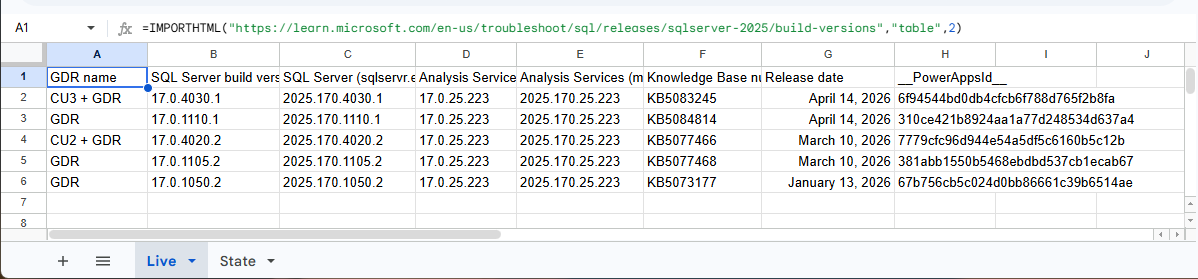
Figure: The IMPORTHTML formula in cell A1 pulling the GDR builds table straight into the sheet, server-side, with no CORS or admin toggle.
IMPORTHTML runs server-side in Google's infrastructure. No CORS. No admin toggle. The formula spills the GDR table across the sheet and Google auto-refreshes it roughly hourly.
The Google Sheets connector in Power Automate is Standard tier, still satisfies the Reddit constraint.
Sheet structure:
Livetab: cell A1 holds the formulaStatetab: single columnKB, seeded with the 5 existing KB numbers
Flow, all standard connectors:
- Recurrence: daily
- Google Sheets → Get rows from
Live - Google Sheets → Get rows from
State - Select: map State rows to a flat array of KB strings
- Filter array: keep Live rows whose KB is not in that array
- Condition
length > 0:- Select → build
<tr>HTML strings from new rows - Office 365 Outlook → Send email with an HTML table
- For each new row → Google Sheets → Insert row into
State
- Select → build
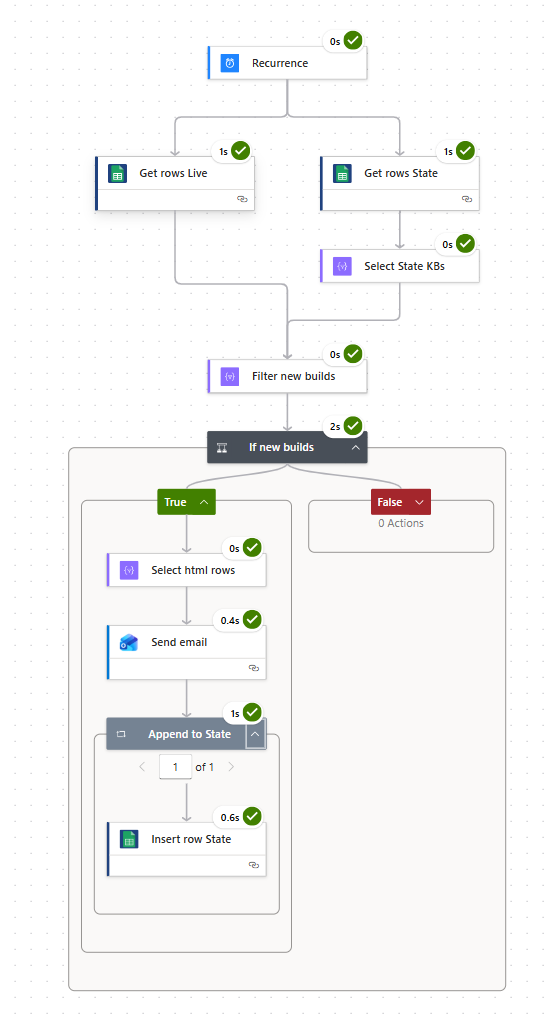
Figure: The Power Automate flow: a daily Recurrence reads the Live and State tabs in parallel, filters for new KBs, and emails them.
The agent deployed the whole thing via FlowStudio MCP's update_live_flow, then flipped the trigger from Button to Recurrence (Button triggers can't be invoked via API in our tenant; Recurrence supports "Test → Manually" in the UI and resubmit via MCP).
The _x0020_ encoding bug that cost a run
First manual test fired the flow. Email arrived with 5 rows… all empty cells. Filter found every row "new" even though State already had all 5 KBs.
Action outputs told the story. The Google Sheets connector encodes column headers in its JSON response:
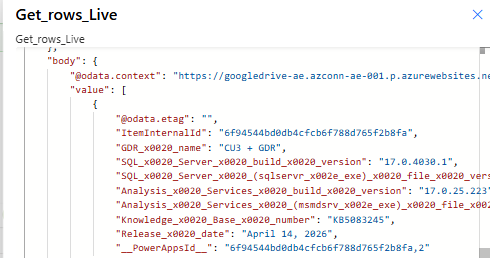
Figure: The raw Get rows output: the column comes back as Knowledge_x0020_Base_x0020_number, the encoded-space trap behind the silent nulls.
| Header in sheet | Property name in JSON |
|---|---|
GDR name |
GDR_x0020_name |
Knowledge Base number |
Knowledge_x0020_Base_x0020_number |
SQL Server (sqlservr.exe) file version |
SQL_x0020_Server_x0020_(sqlservr_x002e_exe)_x0020_file_x0020_version |
Space → _x0020_, dot → _x002e_, every non-alphanumeric character gets the _xHHHH_ Unicode encoding.
The PA designer hides this. It displays and accepts the pretty names in the UI, then serializes to the encoded form under the hood. Writing flow JSON directly (via MCP, ALM tooling, or manual definition editing), you must use the encoded form. item()?['Knowledge Base number'] doesn't throw: it returns null silently, and the whole flow cascades downhill:
contains(array, null)→ alwaysfalse→ filter lets every row throughconcat('<td>', null, '</td>')→ empty cells- Insert row with null values → Sheets silently no-ops (creates blank rows)
All actions return Succeeded the whole time. Nothing in the run history looks wrong. This is exactly where FlowStudio MCP's get_live_flow_run_action_outputs earns its keep: without action-level input/output inspection, a silent-null bug like this is near-invisible. The agent pulled each action's input/output JSON, spotted the null in the filter, and traced it back to the column name.
Fix: item()?['Knowledge_x0020_Base_x0020_number']. The agent redeployed, resubmitted, and the email arrived with one populated row:
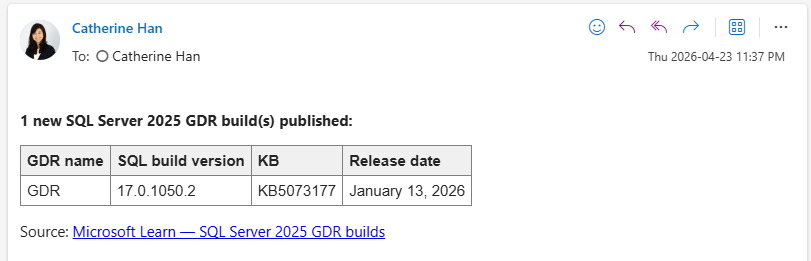
Figure: The result in Outlook: one new SQL Server 2025 GDR build, with the KB in the table.
And State got the KB appended. Done.
Fragility: accepting the trade-offs
Both this and the GitHub-raw-markdown path are fragile in the same way:
IMPORTHTML("...", "table", 2)breaks if Microsoft adds a new table above the GDR one on the Learn page- Column-name references break if the table headers are restructured
- IMPORTHTML's refresh cadence is Google-controlled; combining it with a PA Recurrence schedule stacks two polling layers
For a "tell me when a KB ships" use case, where a day of latency is fine and a page restructure means reopening this post. That's an acceptable trade. For anything time-critical or reliability-sensitive, the right answer is asking Microsoft for a structured feed or paying for the HTTP connector.
Three takeaways
- Office Scripts
fetch()enforces CORS. 30-second diagnostic: swap inhttps://api.github.com/zen. If that works but your real URL fails, it's CORS, and no admin toggle will save you. - Microsoft Learn docs are open-sourced on GitHub. When a Learn URL is CORS-blocked, the raw
.mdsource typically isn't. Click "Edit" on any Learn page to find the source path. - Google Sheets + Excel Online connectors encode column names in JSON. The designer hides it; hand-written flow JSON must use
_x0020_/_x002e_/ etc. Silent nulls are the failure mode: when your flow "succeeds" but outputs are blank, check encoding first.
The whole build + two-pivot debug cycle ran end-to-end through FlowStudio MCP: list_live_flows, get_live_flow, update_live_flow, trigger_live_flow, get_live_flow_runs, get_live_flow_run_action_outputs. The agent never needed me to open Power Automate designer. That's the sell: give your agent the MCP tool surface, give it a constraint, and let it work through its own dead-ends until the flow actually runs.
Fair warning if you build your own: it'll break the day Microsoft restructures the Learn page. That's the accepting-the-trade-off part.
Update 2026-04-24: two cleaner paths for Microsoft-only tenants
The original Reddit asker came back after the post went live: their tenant is Office-Online-only. No Google Workspace, so the IMPORTHTML path above isn't available to them. Same constraint probably applies to a lot of Microsoft-stack shops reading this.
So the agent and I went hunting again. Two better paths emerged.
A cleaner replacement: OneDrive "Upload file from URL"
OneDrive for Business has a standard-tier action labelled "Upload file from URL" (it maps to CopyFile in the connector swagger). It takes a public URL plus a destination path and performs the outbound HTTP inside the connector runtime: same reason IMPORTHTML works in Google Sheets, but now Microsoft-native. No fetch(), no CORS, no premium, no Google dependency.
Combined with the GitHub-hosted markdown source for Microsoft Learn pages (the "side door" from Attempt 1), the full flow is:
- Recurrence: daily
- OneDrive → Get previous content: read the previously-saved snapshot. Configure the
runAfteron the next step to allowFailedso the first run works before the file exists. - Compose
PreviousText:@if(equals(actions('Get_previous_content')['status'], 'Succeeded'), string(body('Get_previous_content')), ''). Defaults to empty string on first run. - Compose
PrevGdrSection: slice just the GDR section out of the markdown (expression finds the anchor and slices to the next##heading). Keeps the diff focused on the table we care about. - OneDrive → Upload file from URL: source
https://raw.githubusercontent.com/MicrosoftDocs/SupportArticles-docs/main/support/sql/releases/sqlserver-2025/build-versions.md, destination/GDRMonitor/build-versions.md, overwritetrue. - OneDrive → Get current content →
CurrentText. - Compose
CurrGdrSection: same slice on the freshly-downloaded content. - Condition
PrevGdrSection ≠ CurrGdrSection→ send email with the new section inline. Otherwise skip.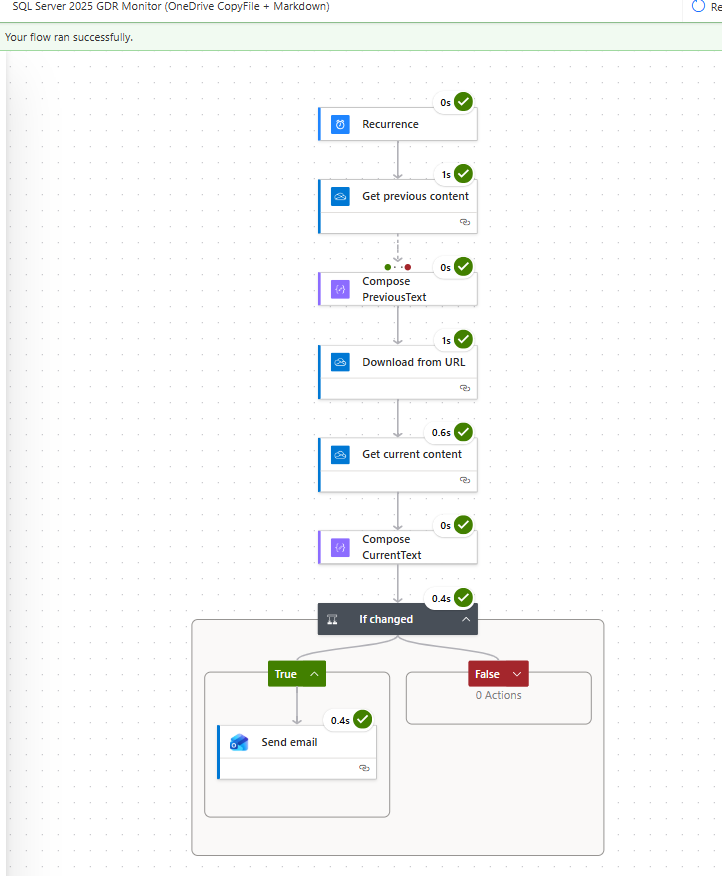
Figure: The OneDrive and Markdown alternative running clean: read the previous snapshot, download the current file, compare, and email only if the GDR section changed.
The same file plays both roles: read it before the overwrite for "what we last saw," read it after for "what the page says now." No second storage file.
Section-slicing is the refinement that matters. If you diff the whole file, a typo fix anywhere on the page fires an email. Slicing down to just the GDR section keeps the alerts noise-free.
Why this beats both of the attempts above:
- Microsoft-only. No Google Workspace, no Office Scripts admin toggles, no service principal dance.
- Fewer moving parts.
- No HTML parsing, no
_x0020_encoding, no column-name fragility: you're diffing raw markdown.
Even simpler: GitHub's per-file ATOM feed
For content that lives on GitHub (which is all of Microsoft Learn), there's a third path that collapses the whole thing to two actions.
GitHub exposes an ATOM feed per file. For the GDR build-versions source, that's:
https://github.com/MicrosoftDocs/SupportArticles-docs/commits/main/support/sql/releases/sqlserver-2025/build-versions.md.atomPower Automate's standard-tier RSS connector has a "When a feed item is published" trigger. Point it at that URL and the whole flow is:
- When a feed item is published: feed URL = the
.atomURL above - Office 365 Outlook → Send email
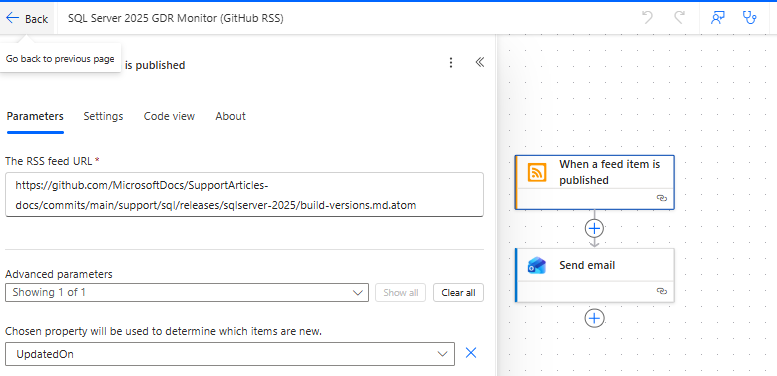
Figure: The simplest version: a two-action flow on GitHub's per-file ATOM feed. A new commit to the build-versions file fires the trigger and sends the email.
No recurrence, no OneDrive, no diff, no markdown parsing. GitHub fires the trigger the moment Microsoft publishes new build info, which is upstream of the Learn page itself.
Caveat: this only works because Microsoft Learn content is open-sourced on GitHub. Random webpages that aren't backed by a git repo can't do this. For those, OneDrive is still the answer.
How this changes the guidance above: if your tenant has Google Workspace, IMPORTHTML still works and the _x0020_ gotcha is still worth knowing. For the Microsoft-only case, which is the more common enterprise scenario, the OneDrive path or the GitHub-ATOM path is where I'd start now.
Same FlowStudio MCP tool surface ran the re-exploration: the agent iterated on the OneDrive flow's first-run edge case, the section-slicing expression, and the RSS trigger config without me opening the designer. Narrower constraint, cleaner answer, same workflow.
Want to try FlowStudio MCP? Free plan includes 100 API calls, no credit card required.
Works with Copilot, Claude, and any MCP-compatible agent.
Related reading:
- AI Agents Can Build Power Automate Flows. Debugging Is the Trap.
- AI Agent Built My Power Automate Flow: 80 Actions Down to 17
- Getting Started with FlowStudio MCP
Catherine Han, FlowStudio